
x Not supported
If Spotter is enabled on your instance, the Spotter interface is set as the default experience in the focused home page layout.
Customize home page experience
Table of Contents
Developers can customize the home page experience in full application embedding to show either the modular home page experience or the focused home page experience, using the homePage attribute in the discoveryExperience object.
Home page customization settings🔗
The following customization settings are available in the SDK to configure the home page experience for the embedding application users:
-
HomePage.ModularWithStylingChanges(Default)
Enables the modular home page experience with customizable components, styling options, and enhanced layout. This experience includes charts in the Watchlist module that are arranged horizontally. Each chart includes menu actions to remove the KPI charts from the watchlist and create alerts, and allows drag-and-drop reordering. -
HomePage.Focused
Enables the focused home page experience, which consolidates the Watchlist and Recents sections into a single, focused view.
To customize the layout and visibility of the home page contents, the SDK provides the following settings:
| Feature | Modular homepage experience | Focused homepage experience |
|---|---|---|
| ✓ Supported | ✓ Supported |
| ✓ Supported | x Not supported |
| ✓ Supported | x Not supported |
| ✓ Supported | x Not supported |
| ✓ Supported |
Modular home page experience🔗
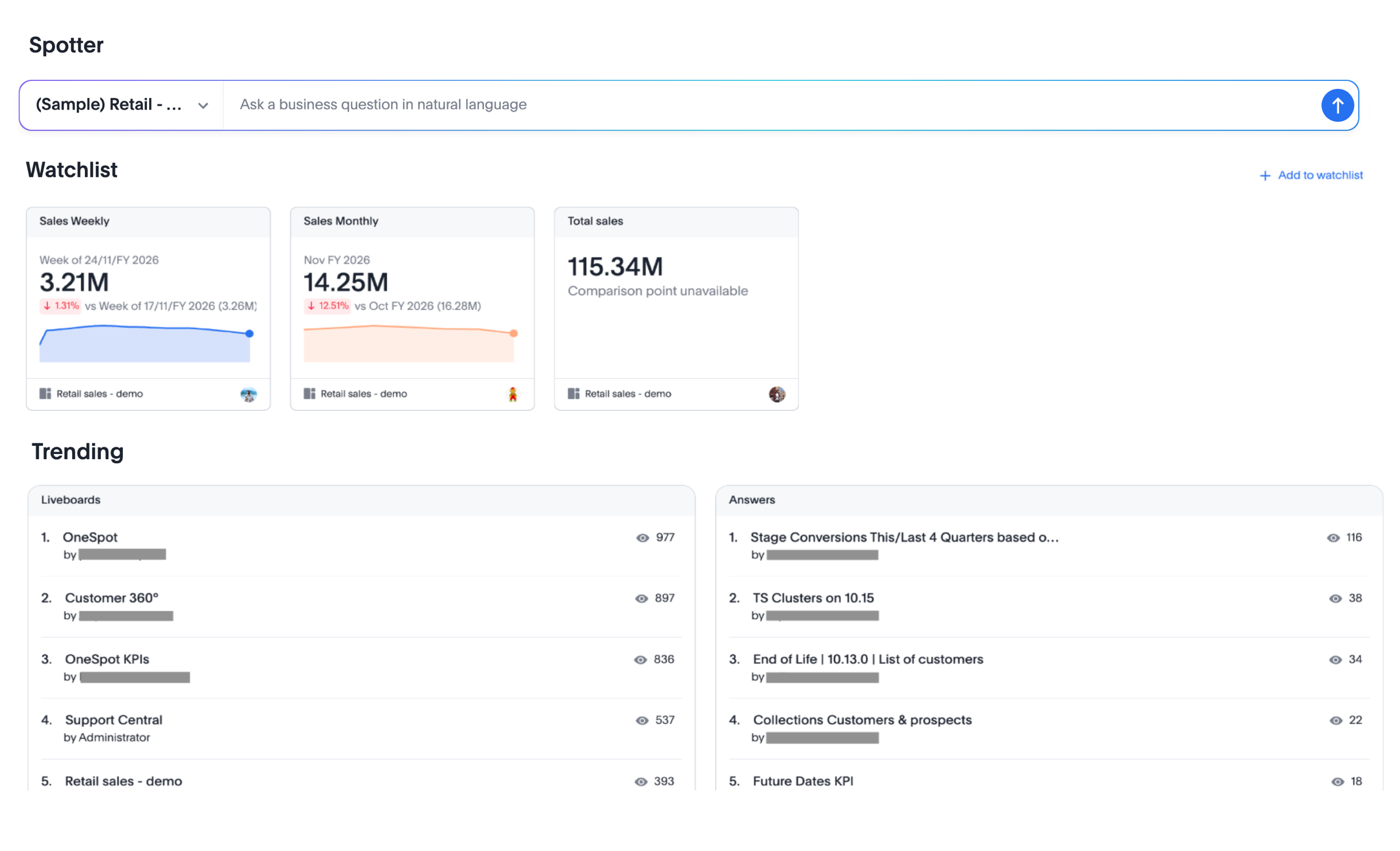
By default, the homePage attribute is set to HomePage.ModularWithStylingChanges in the discoveryExperience object. This enables the modular layout, which includes components such as Search, Spotter (if Spotter is enabled), Watchlist, Library, Trending, and Learning in home page view.
-
The Search module is displayed by default in the embed view. If Spotter is enabled in your instance, you can configure the home page search experience to show the Spotter AI search interface.
-
The charts in the Watchlist module are arranged horizontally. Each chart includes menu actions to remove the KPI charts from the watchlist and create alerts, and allows drag-and-drop reordering.
-
The Trending module displays Liveboards and Answers trending over the last 15 days, or based on overall views, or both.
-
The Library module displays the objects available to the user.
Modular home page experience
Focused home page experience🔗
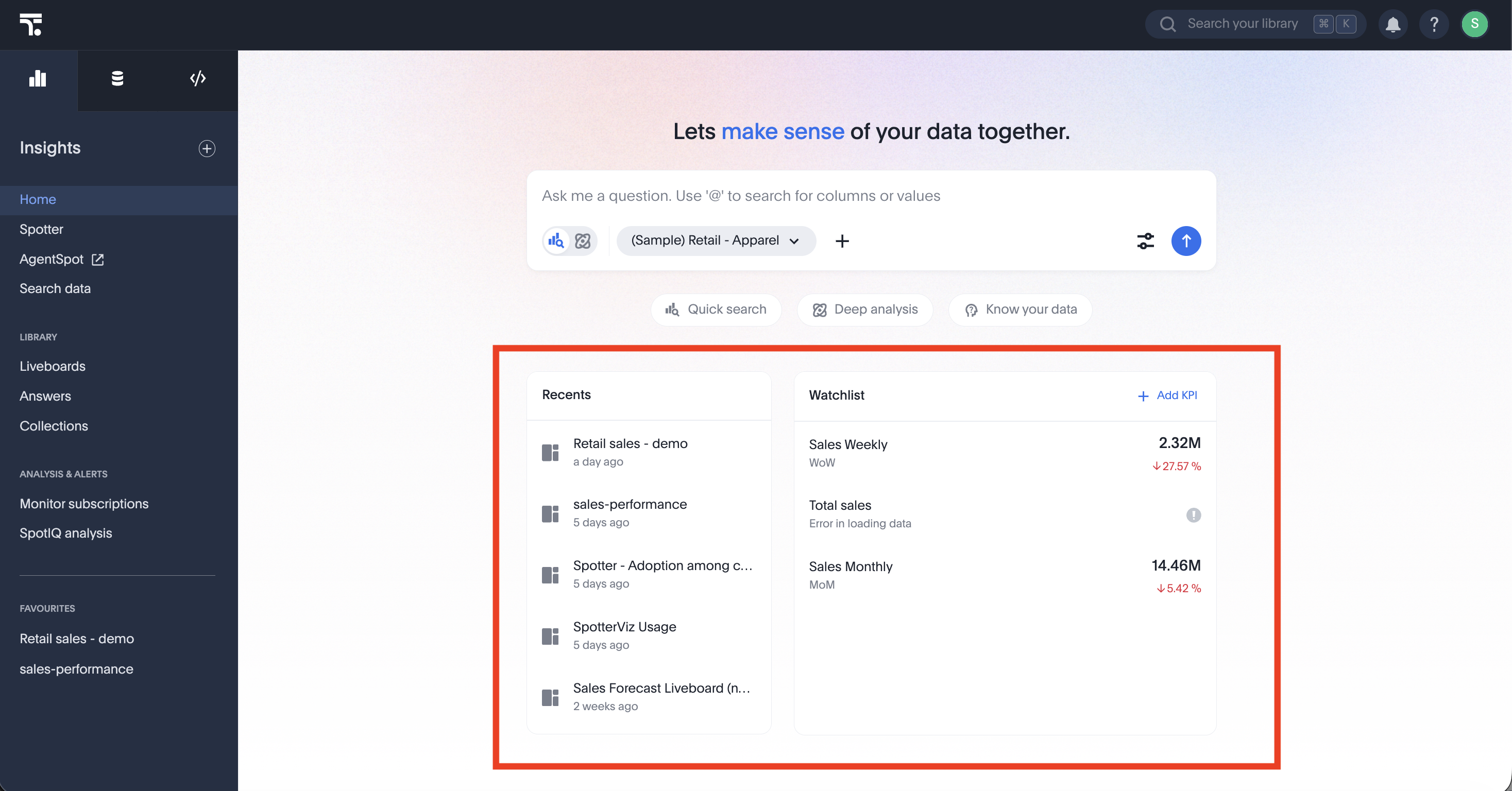
The focused home page provides a contemporary experience that highlights the most relevant content immediately. It provides quick access to the Spotter interface and consolidates the Watchlist KPIs and Recents sections into a unified, focused layout.
To enable this layout in your embed, set the homePage attribute to HomePage.Focused in the discoveryExperience object.
|
Note
|
The focused home page experience requires Spotter to be enabled on your instance. If Spotter is not enabled, the embed always renders the modular home page experience, regardless of the |
// Import required components and enums
import {
    AppEmbed,
    HomePage // Enum for home page experience settings
} from '@thoughtspot/visual-embed-sdk';

const embed = new AppEmbed("#embed", {
     discoveryExperience: {
         homePage: HomePage.Focused, // Enable focused home page experience
     },
     showPrimaryNavbar: true,
     //... other embed view configuration attributes
});
Focused home page experience
Customizing home page modules🔗
If you are using the modular home page experience, you can hide specific modules or change the order of the modules using the hiddenHomepageModules and reorderedHomepageModules configuration attributes in the SDK.
Both the hiddenHomepageModules and reorderedHomepageModules properties require you to specify the home page modules that you want to hide or reorder in the HomepageModule[] array. Valid values include:
| Value | Description |
|---|---|
| The Watchlist module showing the objects added to the user’s watchlist. |
| The My Library module showing user’s content. |
| The Learning module with onboarding content. |
| The Trending module showing trending content. |
| The Search module showing the object search bar. |
| The Favorites list showing the user’s favorite objects in the left navigation panel. |
- Example
import {
    AppEmbed, // Main class to embed the full ThoughtSpot app
    HomePage, // Enum for home page experience settings
    HomepageModule // Enum for home page modules
} from '@thoughtspot/visual-embed-sdk';

const embed = new AppEmbed("#embed", {
    discoveryExperience: {
        homePage: HomePage.ModularWithStylingChanges, // Enables the modular home page.
    },
    // Hide modules from the home page
    hiddenHomepageModules: [
        HomepageModule.Learning,
        HomepageModule.Trending
    ],
    // Custom order for visible modules
    reorderedHomepageModules: [
        HomepageModule.Search,
        HomepageModule.Favorite,
        HomepageModule.Watchlist,
        HomepageModule.MyLibrary
    ],
    //... other view configuration properties
});
Customize the search module on the home page🔗
In the modular home page experience, you can customize the search experience using the homePageSearchBarMode parameter. By default, the modular home page includes the object search bar that allows finding popular objects. If Spotter is enabled on your instance, you can replace the search module with the Spotter AI search interface instead. You can also choose to hide the search bar from the home page.
| Search bar mode | Description |
|---|---|
| Enables the Spotter search module that allows you to ask questions in natural language. |
| Enables object search that allows users to find objects from the library. Default experience in the modular home page layout. To use Spotter search, set |
| Hides the search bar on the home page. Note that it only hides the Search bar on the Home page and doesn’t affect the Object Search bar visibility on the top navigation bar. |
|
Note
|
The home page search bar customization setting does not apply to the focused home page layout. |
Example🔗
The following example shows a code snippet to set the home page search bar mode to Spotter or AI search:
- Modular home page experience
import {
    AppEmbed,
    HomePage, // Enum for home page experience settings
    HomePageSearchBarMode // Import the enum for search bar mode options
} from '@thoughtspot/visual-embed-sdk';

const embed = new AppEmbed("#embed", {
    discoveryExperience: {
        homePage: HomePage.ModularWithStylingChanges // Enable modular home page experience
    },
    // Set the home page search bar to show the Spotter / AI search bar
    homePageSearchBarMode: HomePageSearchBarMode.AI_ANSWER
    // Other view configuration attributes
});