
curl -X POST \
  --url 'https://{ThoughtSpot-Host}/api/rest/2.0/auth/token/full'  \
  -H 'Accept: application/json' \
  -H 'Content-Type: application/json' \
  --data-raw '{
  "username": "secured_user",
  "secret_key": "{secret_key}",
  "user_parameters": {
    "runtime_filters": [
      {
        "column_name": "Country",
        "operator": "IN",
        "values": ["Germany", "Australia"],
        "persist": true
      }
    ],
    "parameters": [
      {
        "name": "Secured",
        "values": ["f65fee3a-75f4-4e6e-a801-995113566d68"],
        "persist": true
      }
    ]
  }
}'JWT ABAC Beta implementation → ABAC via RLS
Table of Contents
In this migration scenario, we’ll migrate your JWT ABAC Beta implementation to ABAC via RLS.
Scope and prerequisites🔗
This document assumes that you are currently using the /api/rest/2.0/auth/token/full or /api/rest/2.0/auth/token/object endpoints for ABAC token generation, and provides instructions to migrate your ABAC implementation to the /api/rest/2.0/auth/token/custom API endpoint. These migration steps apply only if:
-
Your implementation has used the legacy method of generating JWT tokens via
/api/rest/2.0/auth/token/fullor/api/rest/2.0/auth/token/objectAPI endpoint. -
Your instance has the necessary configuration settings enabled for migrating JWT token generation process from the
/api/rest/2.0/auth/token/fullto the/api/rest/2.0/auth/token/customAPI endpoint.
|
Important
|
The legacy JWT ABAC Beta implementation is deprecated and is not recommended for ABAC implementations. |
Migration steps🔗
To migrate JWT ABAC Beta implementation to the ABAC via RLS rules method, complete the following steps:
-
Roll out and decommission legacy JWT ABAC
Review your JWT ABAC Beta implementation🔗
A typical JWT ABAC Beta implementation includes the following:
JWT generation via POST /api/rest/2.0/auth/token/full, with runtime_filters and other attributes populated for creating data security rules. Depending on user requirements, the values may be set on all models or on specific models.
You may also be using a parameter property to pass a validation in the data model and ensure that the model is secured by default, as shown in the following token request example:
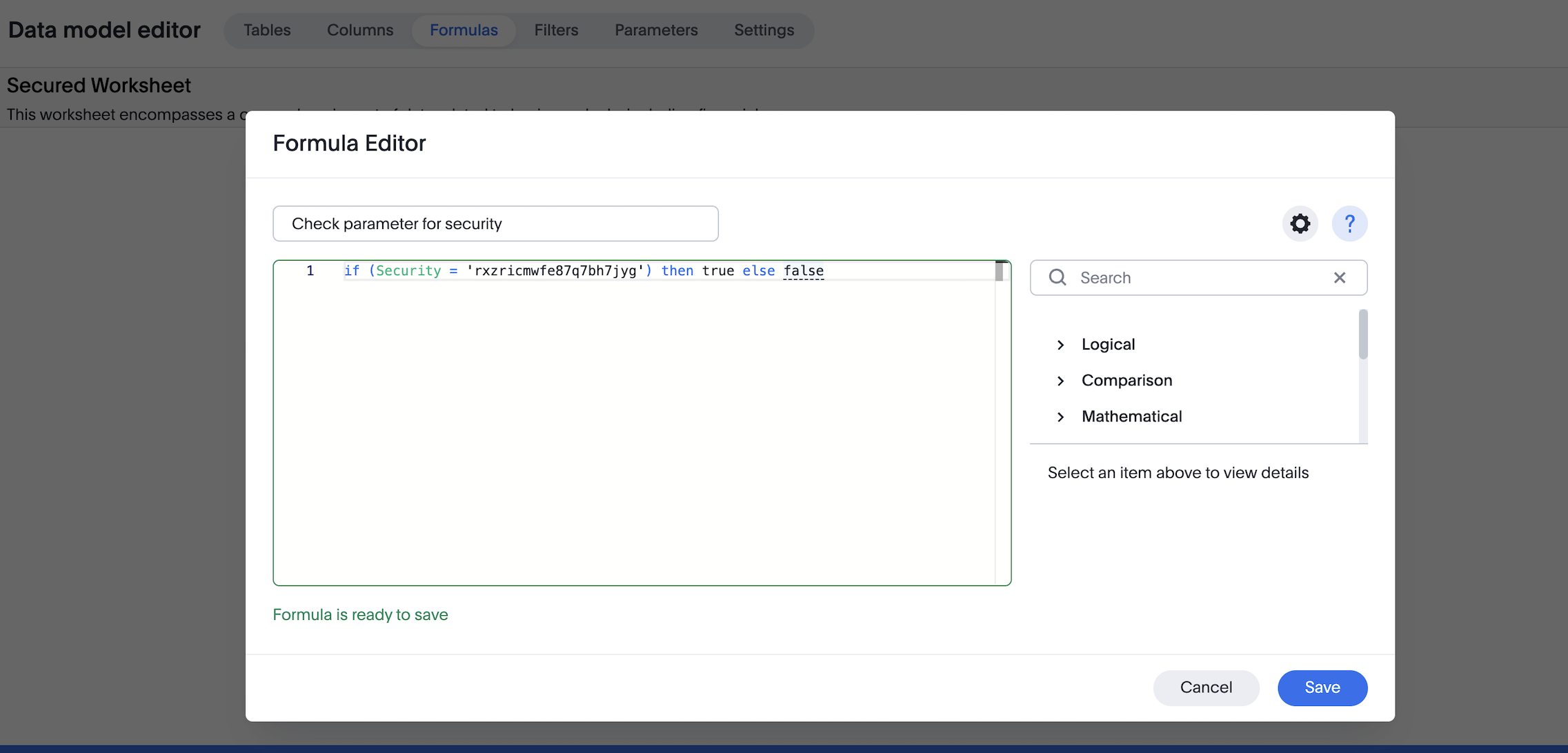
Ensure that indexing is disabled on all sensitive columns in your tables.
Retrieve values stored for each user (Optional)🔗
If required, you can retrieve the values previously stored for each user after token generation. To do so, get user metadata via the /api/rest/2.0/users/search API endpoint. The response from this call provides a list of filter and variable values in the user_parameters section of the output.
For example:
[{
	"id": "0000084b-1e75-d506-8258-0b6abbb863ed",
	"name": "testjwtuser",
	"display_name": "testjwtuser",
	[...]
	"user_parameters": {
		"<org_id>": {
          "runtimeFilters": [{
            "columnName": "Country",
			"operator": "IN",
			"values": ["Germany", "Australia"]
          }],
        }
	},
	"variable_values": {}
}]
This can be helpful when you design equivalent ABAC via RLS rules and want to validate that the same logic will be enforced.
Set up ABAC via RLS🔗
Configure ABAC via RLS while keeping the legacy Beta JWT ABAC in place.
-
Create variables (type
FORMULA_VARIABLE) using/api/rest/2.0/template/variables/create. These variables will be referenced in your RLS security rules. -
Create RLS rules on tables and reference these variables in the rules.
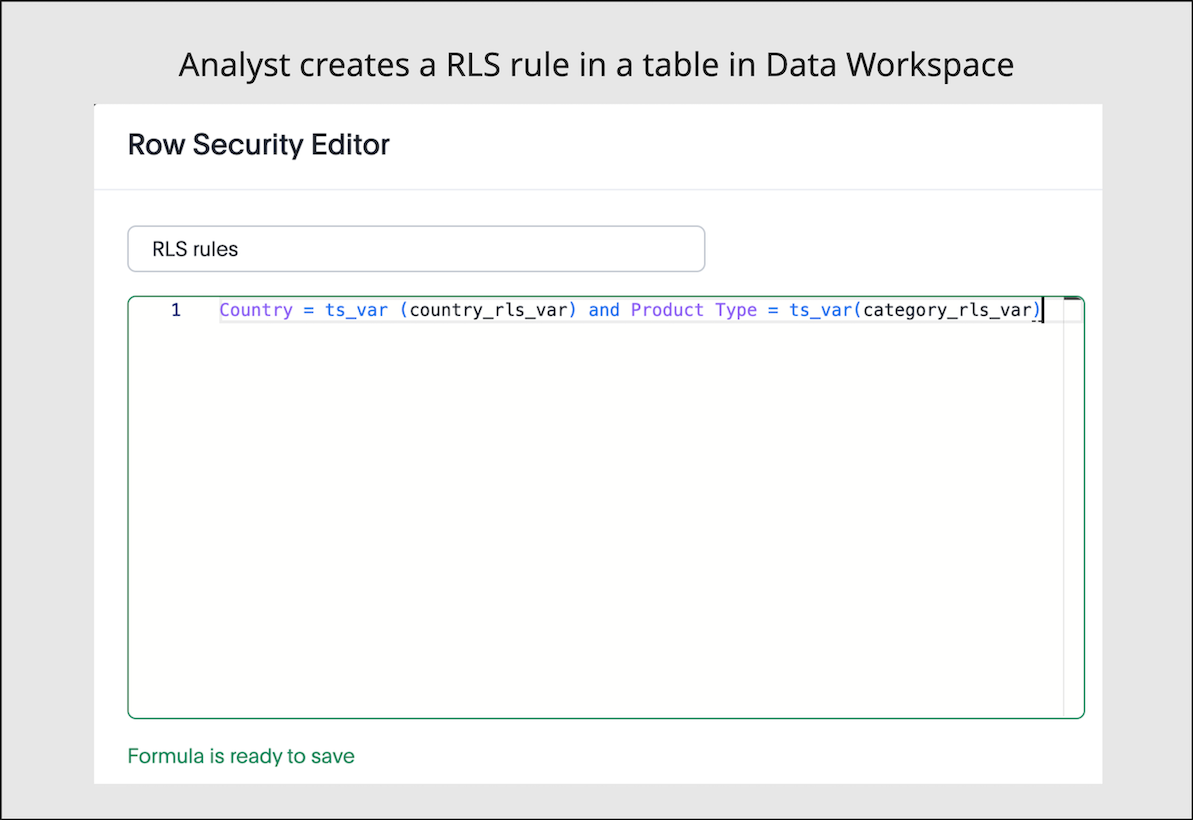
Where applicable, replicate your existing JWT ABAC Beta logic. To add more than one condition, you can use the AND operator.
To assign values to these variables, define the variable_values in your token generation request to /api/rest/2.0/auth/token/custom. These attributes will replace conditions defined via runtime_filters in your current JWT ABAC Beta implementation.
|
Note
|
The variable values can be scoped to specific models, so that different security rules can be applied to different data sets in ThoughtSpot. |
curl -X POST \
  --url 'https://{ThoughtSpot-Host}/api/rest/2.0/auth/token/custom'  \
  -H 'Accept: application/json' \
  -H 'Content-Type: application/json' \
  --data-raw '{
  "username": "secured_user",
  "secret_key": "{secret_key}",
  "persist_option": "REPLACE",
  "variable_values": [
    {
      "name": "country_rls_var",
      "values": [
        "Germany",
        "Australia"
      ]
    },
    {
      "name": "category_rls_var",
      "values": [
        "Jeans",
        "Jackets"
      ]
    }
  ],
  "objects": [
    {
      "type": "LOGICAL_TABLE",
      "identifier": "model1-guid"
    },
    {
      "type": "LOGICAL_TABLE",
      "identifier": "model2-guid"
    }
  ]
}'
Keep indexing disabled on all sensitive columns.
|
Note
|
|
Verify variable values for users (Optional)🔗
Verify that variable values are correctly assigned to users using one of the following methods:
-
Send a
POSTrequest to the/api/rest/2.0/users/searchwith user details, and explore thevariable_valuessection of the response payload. -
Send a
POSTrequest to the/api/rest/2.0/template/variables/searchAPI endpoint with variable details. In the request body, specify theresponse_contentasMETADATA_AND_VALUES, and explore the variable values for each user in the response payload.
If you want to update the values of variables, use either /api/rest/2.0/template/variables/{identifier}/update-values or /api/rest/2.0/auth/token/custom API endpoint.
Review the configuration🔗
Before you begin testing, your setup should have the following JWT ABAC configuration:
-
Your JWT ABAC Beta implementation has tokens generated for your users via
POST /api/rest/2.0/auth/token/full, withruntime_filtersand required parameters. -
Variables are configured, RLS rules with variables are applied on the tables, and the values for variables are defined in the tokens generated via
/api/rest/2.0/auth/token/customAPI endpoint.
Test the migration🔗
We recommend testing the migration in three stages:
-
Verify user entitlements when both ABAC via RLS and JWT ABAC Beta tokens are enabled.
-
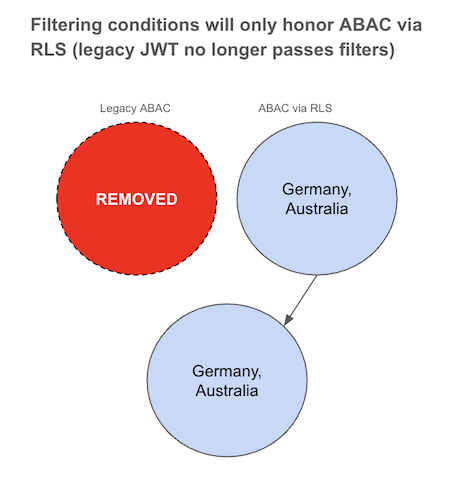
Remove filtering conditions on legacy JWT Beta tokens to test how security rules function with solely ABAC via RLS.
-
Remove legacy JWT Beta and verify the ABAC via RLS.
Phase 1: ABAC via RLS while JWT ABAC Beta token is still active🔗
In this step, create the following token requests:
-
Set security rules for JWT Beta using
POST /api/rest/2.0/auth/token/fullAPI endpoint. For example:curl -X POST \ --url 'https://{ThoughtSpot-Host}/api/rest/2.0/auth/token/full' \ -H 'Accept: application/json' \ -H 'Content-Type: application/json' \ --data-raw '{ "username": "secured_user", "secret_key": "{secret_key}", "user_parameters": { "runtime_filters": [ { "column_name": "Country", "operator": "IN", "values": ["Germany", "Australia"], "persist": true } ], "parameters": [ { "name": "Secured", "values": ["f65fee3a-75f4-4e6e-a801-995113566d68"], "persist": true } ] } }' -
Set variable values for ABAC via RLS using
POST /api/rest/2.0/auth/token/customAPI endpoint. For example:curl -X POST \ --url 'https://{ThoughtSpot-Host}/api/rest/2.0/auth/token/custom' \ -H 'Accept: application/json' \ -H 'Content-Type: application/json' \ --data-raw '{ "username": "secured_user", "secret_key": "{secret_key}", "persist_option": "REPLACE", "variable_values": [ { "name": "country_rls_var", "values": [ "Germany", "Australia" ] } ] }'
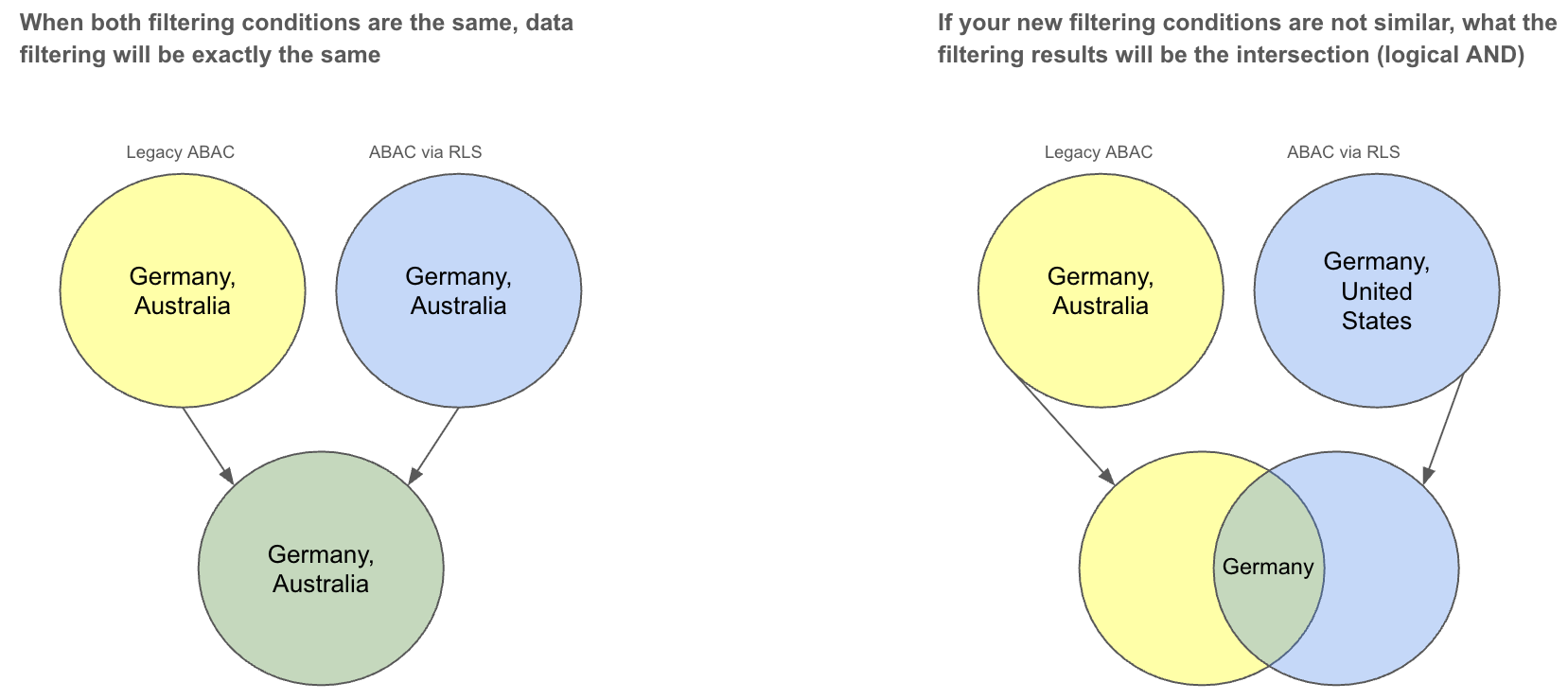
Since both conditions are similar, the data should be filtered uniformly as illustrated in the following diagram. If the filtering conditions differ, the resulting data should be the intersection of the two.
Phase 2: Bypass JWT ABAC Beta attributes🔗
If the test above is conclusive, the next step is to test bypassing legacy JWT Beta attributes. To achieve this:
-
Remove all conditions for filters and leave parameters unchanged.
curl -X POST \ --url 'https://{ThoughtSpot-Host}/api/rest/2.0/auth/token/full' \ -H 'Accept: application/json' \ -H 'Content-Type: application/json' \ --data-raw '{ "username": "secured_user", "secret_key": "{secret_key}", "user_parameters": { "runtime_filters": [ ], "parameters": [ { "name": "Secured", "values": ["f65fee3a-75f4-4e6e-a801-995113566d68"], "persist": true } ] } }' -
Verify that your users no longer have
runtime_filtersvalues by calling thePOST /api/rest/2.0/users/searchAPI. The user property must show an emptyuser_parameters.runtimeFiltersproperty. -
With your user no longer having filtering conditions applied via JWT ABAC Beta, create a login token passing security rules using
POST /api/rest/2.0/auth/token/customAPI endpoint to implement ABAC via RLS.curl -X POST \ --url 'https://{ThoughtSpot-Host}/api/rest/2.0/auth/token/custom' \ -H 'Accept: application/json' \ -H 'Content-Type: application/json' \ --data-raw '{ "username": "secured_user", "secret_key": "{secret_key}", "persist_option": "REPLACE", "variable_values": [ { "name": "country_rls_var", "values": [ "Germany", "Australia" ] } ] }'
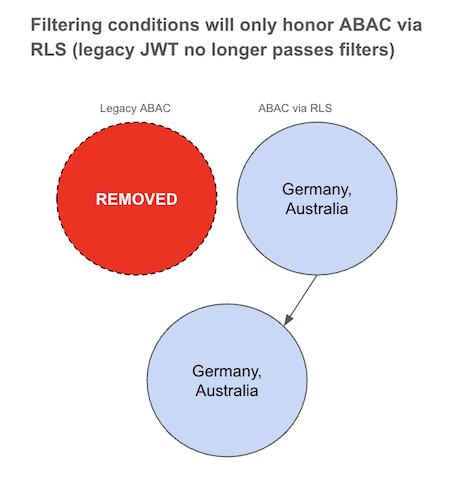
In this configuration, filtering rules will only follow ABAC via RLS rules defined via variable_values, because the legacy JWT Beta token doesn’t include any specific filter conditions and allows all.
Phase 3: Remove all JWT ABAC Beta configuration🔗
After you have validated behavior with JWT ABAC Beta attributes bypassed, remove the legacy JWT check parameter from your data model.
-
Open the data model that you secured via JWT ABAC Beta token implementation and do the following:
-
Delete the filter based on the security formula.
-
Delete the security formula.
-
Delete the security parameter.
-
Click Save Changes.
-
-
Authenticate your users with the token generated via
/api/rest/2.0/auth/token/customAPI endpoint. Authenticate users exclusively usingPOST /api/rest/2.0/auth/token/customAPI endpoint. Ensure thatvariable_valuesare defined in the token.
This will result in the same filtering logic for that user, with the JWT ABAC Beta token no longer applied.
Examples for mapping JWT ABAC Beta expressions to ABAC via RLS🔗
The following examples show how to map common JWT ABAC Beta expressions to equivalent RLS rules.
| Operator | Expression in JWT ABAC Beta | Equivalent RLS expression (ABAC via RLS) |
|---|---|---|
| |
|
| |
|
| |
|
| |
|
|
Note
|
RLS supports multi-value variables and rich expression functions (such as |
Additional resources🔗
-
For information about JWT with custom variables and RLS rules, see ABAC via RLS rules.
-
For information about RLS, see RLS Rules and ThoughtSpot Product Documentation.