{
  "data": {
    "currentUser": {
      "displayName": "Guest 1",
      "email": "[email protected]"
    },
    "schemaVersion": "v1",
    "schemaType": "MONITOR",
    "notificationType": "UPDATION",
    "updationWebhookNotification": {
      "modifyUrl": "",
      "monitorRuleForWebhook": {
        "scheduleString": "hourly every hour ",
        "metricName": "Total Revenue Trend",
        "alertType": "Scheduled",
        "metricId": {
          "pinboardVizId": {
            "pinboardId": "22a8f618-0b4f-4401-92db-ba029ee13486",
            "vizId": "ce4dc8ca-e4f9-4fd4-b562-2bb9e69fd0cb"
          }
        },
        "metricUrl": "http://{ThoughtSpot-Host}/?utm_source=kpi_monitor&utm_medium=webhook/#/pinboard/22a8f618-0b4f-4401-92db-ba029ee13486/ce4dc8ca-e4f9-4fd4-b562-2bb9e69fd0cb",
        "ruleName": "Alert on Total Revenue Trend",
        "conditionString": "",
        "ruleId": "a4b0a1f4-279d-42ab-a710-4ba6964869fa"
      },
      "unsubscribeUrl": "http://{ThoughtSpot-Host}/?utm_source=kpi_monitor&utm_medium=webhook/#/pinboard/22a8f618-0b4f-4401-92db-ba029ee13486/ce4dc8ca-e4f9-4fd4-b562-2bb9e69fd0cb?ts-type=unsubscribeFromRule&ts-ruleid=a4b0a1f4-279d-42ab-a710-4ba6964869fa"
    }
  }
}Webhooks for KPI monitor alerts
Table of Contents
ThoughtSpot users with administrator or developer privileges can register a webhook to send Monitor alerts from a Key Performance Indicator (KPI) chart to an external application. KPI Monitor alerts notify users when a KPI metric meets a threshold condition or periodically as per the schedule configured by the user.
For example, you can create an alert to be notified when a Sales KPI exceeds a threshold of 200,000, or when your weekly sales increase by 2%. By default, the email notifications are sent to the alert subscriber’s email address. With webhooks, you can trigger alerts to the REST endpoint of an external application via HTTP POST requests and customize your application workflow to present these alerts as SMS messages or Slack notifications.
|
Note
|
To configure KPI alert webhooks, you need administrator or developer privileges on your ThoughtSpot instance. |
Before you begin🔗
-
Make sure your ThoughtSpot user account has the privileges required to access the Develop page in the ThoughtSpot UI.
-
Your destination application has a callback URL to accept HTTP POST requests.
-
If you plan to use OAuth authentication, make sure you have the OAuth credentials and authorization URL of your application
-
If you plan to use an API key for authentication, ensure that you have a valid API key.
Configuring a webhook for KPI alerts🔗
To configure a webhook and send KPI monitor alerts to an external application or URL, create a webhook in ThoughtSpot UI.
Assign webhook to a KPI Monitor alert🔗
To assign the registered webhook to an alert:
-
Go to a KPI chart and click the Create alert icon.
If the alert is already configured, go to Monitor and click Edit alert to modify the alert properties. -
In the alert configuration modal, go to Select notification channel and select Custom channel and the webhook.
-
Ensure that alert type and subscription details are defined.
-
Click Save.
Based on the type of alert, the notification payload will be sent in JSON format to the webhook URL via HTTP POST request.
The following example shows the notification payload:
Webhook schema🔗
The following Webhook schema is used when sending an HTTP POST request body to the registered Webhook URL:
WebhookNotification {
    enum SchemaVersion,
    enum EventSchemaType,
    enum NotificationType,
    User CurrentUser,
    DeletionWebhookNotification deletionWebhookNotification,
    FailureWebhookNotification failureWebhookNotification,
    ScheduledMetricUpdateWebhookNotification scheduledMetricUpdateWebhookNotification,
    SelfSubscriptionWebhookNotification selfSubscriptionWebhookNotification,
    SubscriptionWebhookNotification subscriptionWebhookNotification,
    ThresholdReachedMetricUpdateWebhookNotification thresholdReachedMetricUpdateWebhookNotification,
    UpdationWebhookNotification updationWebhookNotification,
}
The fields are populated according to the notification type. For all types of notifications, the following four fields are populated:
-
SchemaVersion
The version of the schema usedenum SchemaVersion { v1, } -
EventSchemaType
Type of the schema usedenum EventSchemaType { MONITOR, } -
NotificationType
Type of the monitor notification sentenum NotificationType { SELF_SUBSCRIPTION, DELETION, UPDATION, FAILURE, SUBSCRIPTION, SCHEDULE_METRIC_UPDATE, THRESHOLD_METRIC_UPDATE, } -
CurrentUser
User for which the notification is sent.User { String id, String displayName, String email, }
Conditional fields include:
-
DeletionWebhookNotification deletionWebhookNotification
Populated only when notificationType is DELETION. -
FailureWebhookNotification failureWebhookNotification
Populated only when notificationType is FAILURE. -
ScheduledMetricUpdateWebhookNotification scheduledMetricUpdateWebhookNotification,
Populated only when notificationType is SCHEDULE_METRIC_UPDATE. -
SelfSubscriptionWebhookNotification selfSubscriptionWebhookNotification,
Populated only when notificationType is SELF_SUBSCRIPTION. -
SubscriptionWebhookNotification subscriptionWebhookNotification,
Populated only when notificationType is SUBSCRIPTION. -
ThresholdReachedMetricUpdateWebhookNotification thresholdReachedMetricUpdateWebhookNotification,
Populated only when notificationType is THRESHOLD_METRIC_UPDATE. -
UpdationWebhookNotification updationWebhookNotification
Populated only when notificationType is UPDATION.
The following examples show the schema for different alert notification types:
Scheduled alert notification🔗
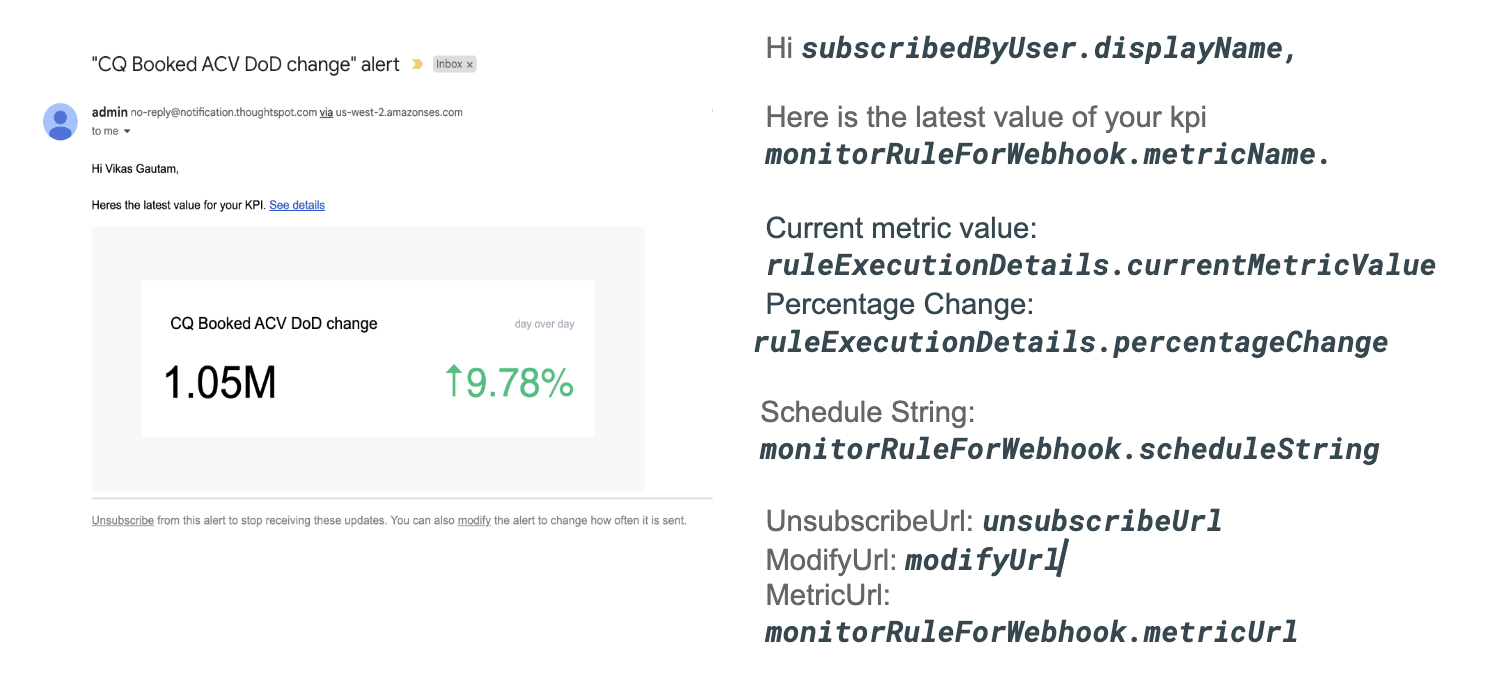
A scheduled alert is sent as per the configured periodicity.
The following schema is used in the notification sent for scheduled alerts:
ScheduledMetricUpdateWebhookNotification {
    MonitorRuleForWebhook monitorRuleForWebhook,
    String modifyUrl,
    String unsubscribeUrl,
    RuleExecutionDetails ruleExecutionDetails,
}
The following example shows the email notification for a scheduled alert:
Threshold alert notification🔗
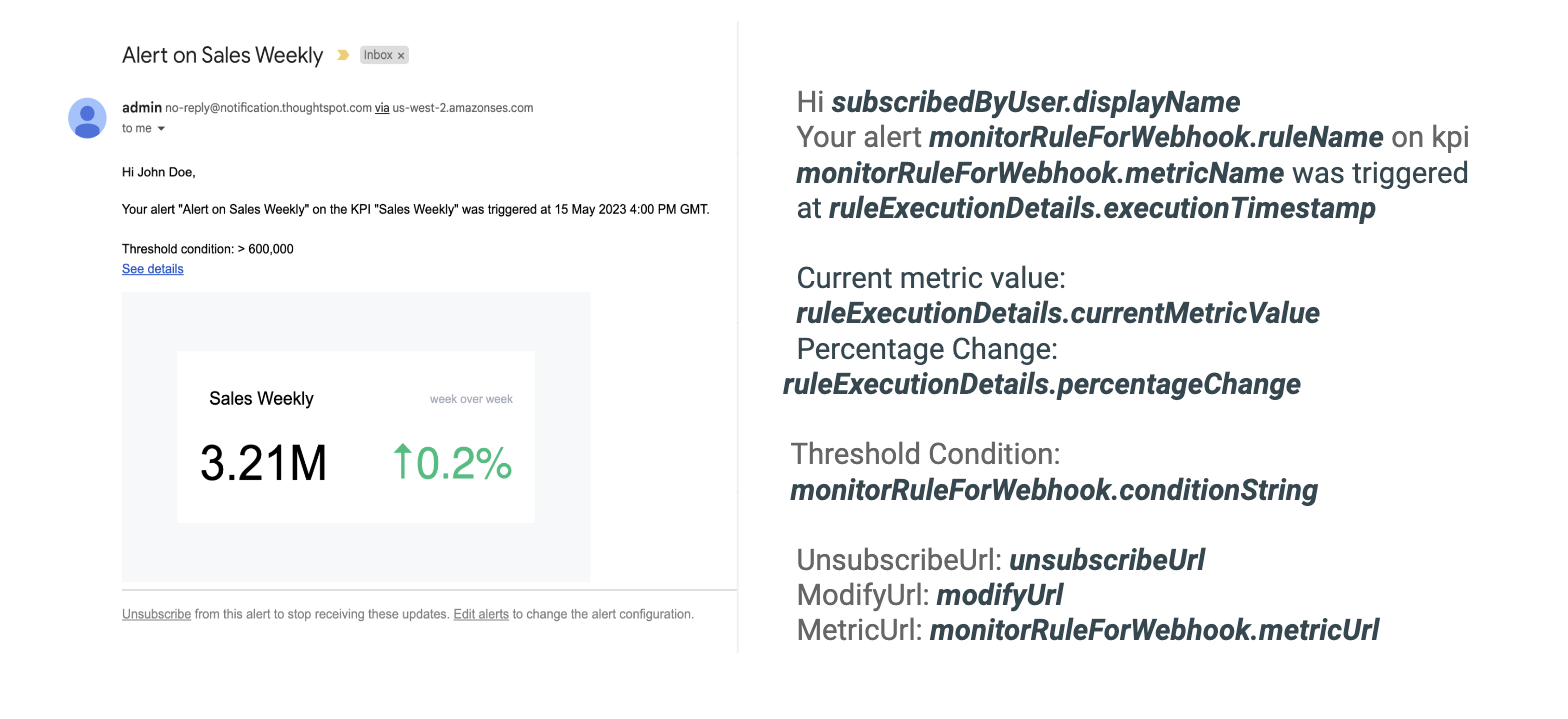
A threshold alert is sent when a metric in the KPI chart reaches the configured threshold.
The following schema is used in the notification sent for threshold alerts:
ThresholdReachedMetricUpdateWebhookNotification {
    MonitorRuleForWebhook monitorRuleForWebhook,
    String modifyUrl,
    String unsubscribeUrl,
    RuleExecutionDetails ruleExecutionDetails,
}
The following example shows the email notification for a threshold alert:
SelfSubscription notification🔗
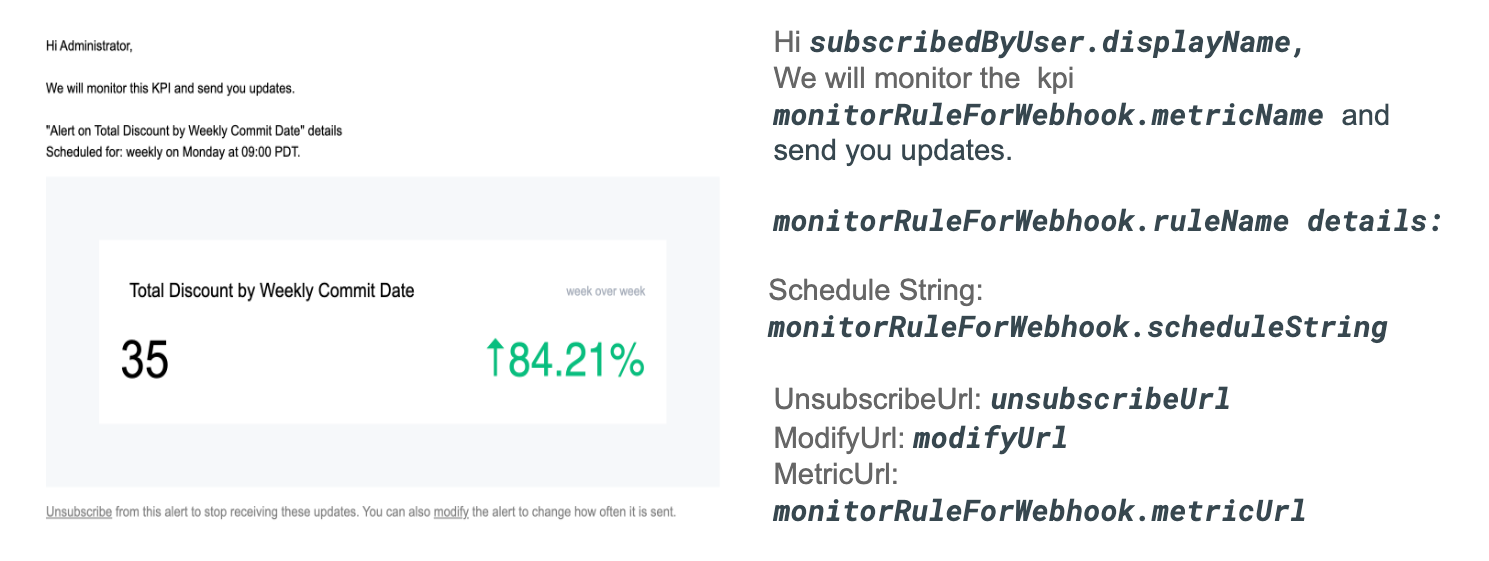
A self-subscription notification is sent for alerts self-subscribed by a user.
The following schema is used in the notification sent for self-subscribed notifications:
SelfSubscriptionWebhookNotification {
    MonitorRuleForWebhook monitorRuleForWebhook,
    String modifyUrl,
    String unsubscribeUrl,
    RuleExecutionDetails ruleExecutionDetails,
}
The following example shows the email notification sent for a self-subscribed alert:
Subscription notifications🔗
A subscription notification is sent when a user subscribes to a notification.
The following schema is used in the subscription notification:
SubscriptionWebhookNotification {
    MonitorRuleForWebhook monitorRuleForWebhook,
    String modifyUrl,
    String unsubscribeUrl,
    RuleExecutionDetails ruleExecutionDetails,
    User subscribedByUser,
}
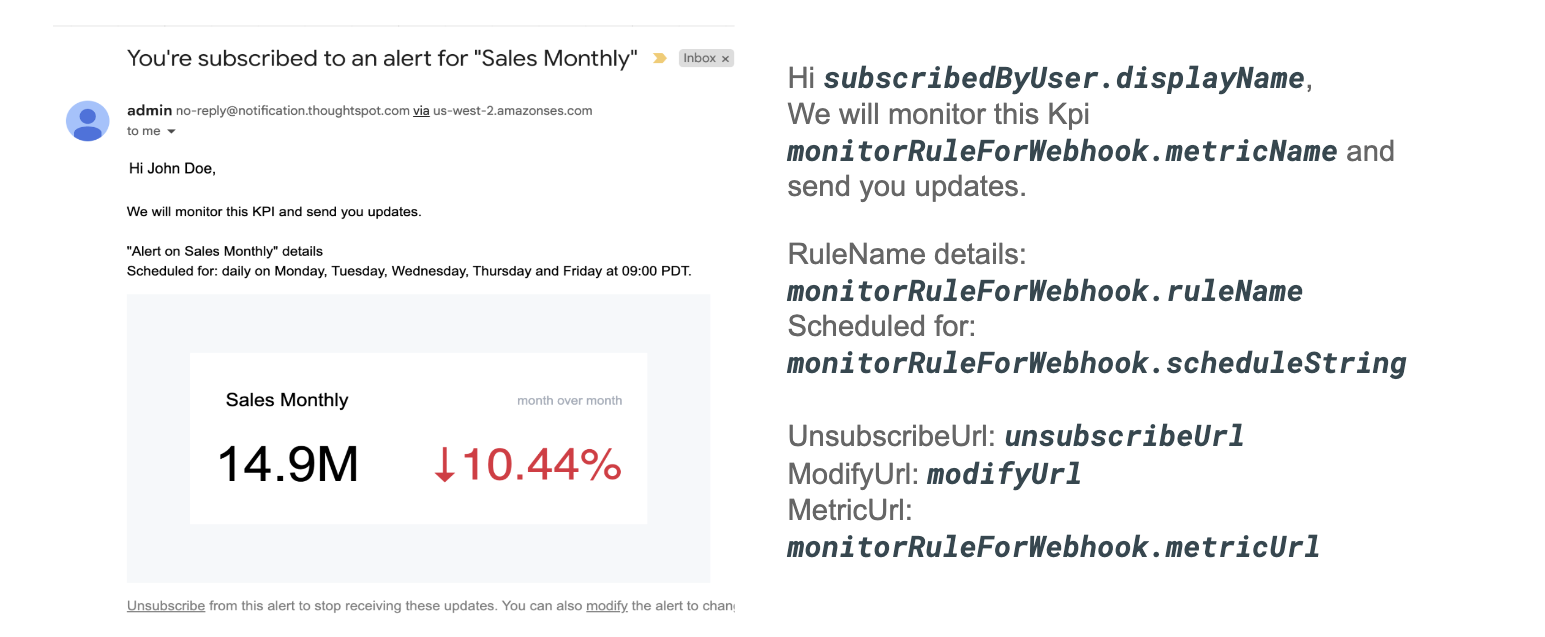
The following example shows the email notification sent from ThoughSpot after a user subscribes to an alert:
Delete Webhook notification🔗
A delete notification is sent to subscribers when an alert they subscribed to is deleted in ThoughtSpot.
The following schema is used in the notification sent when an alert is deleted:
DeletionWebhookNotification {
	String ruleName,
	String metricName,
	MetricId metricId,
	User deletedByUser,
}
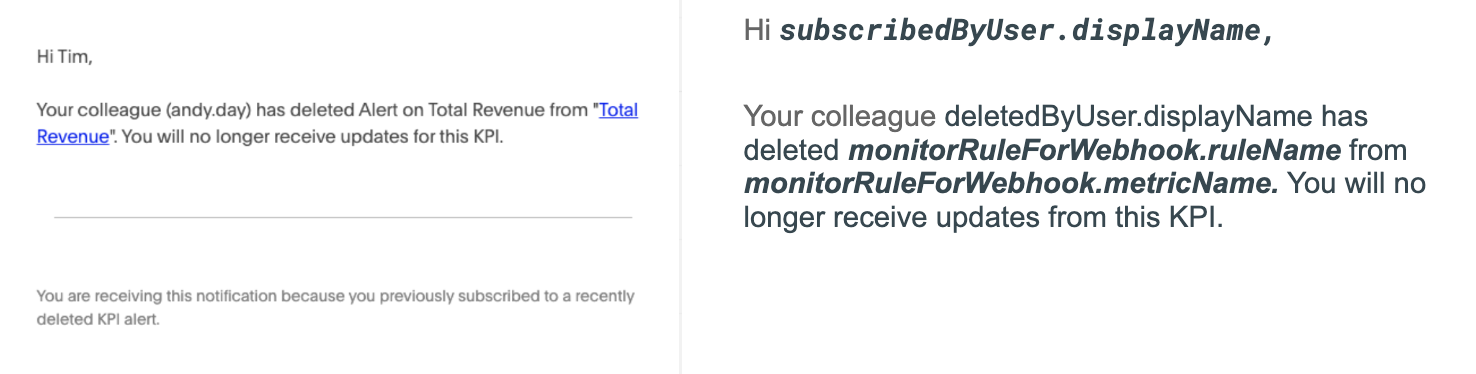
The following example shows the email notification sent to the subscribers when an alert is deleted:
Failure Webhook notification🔗
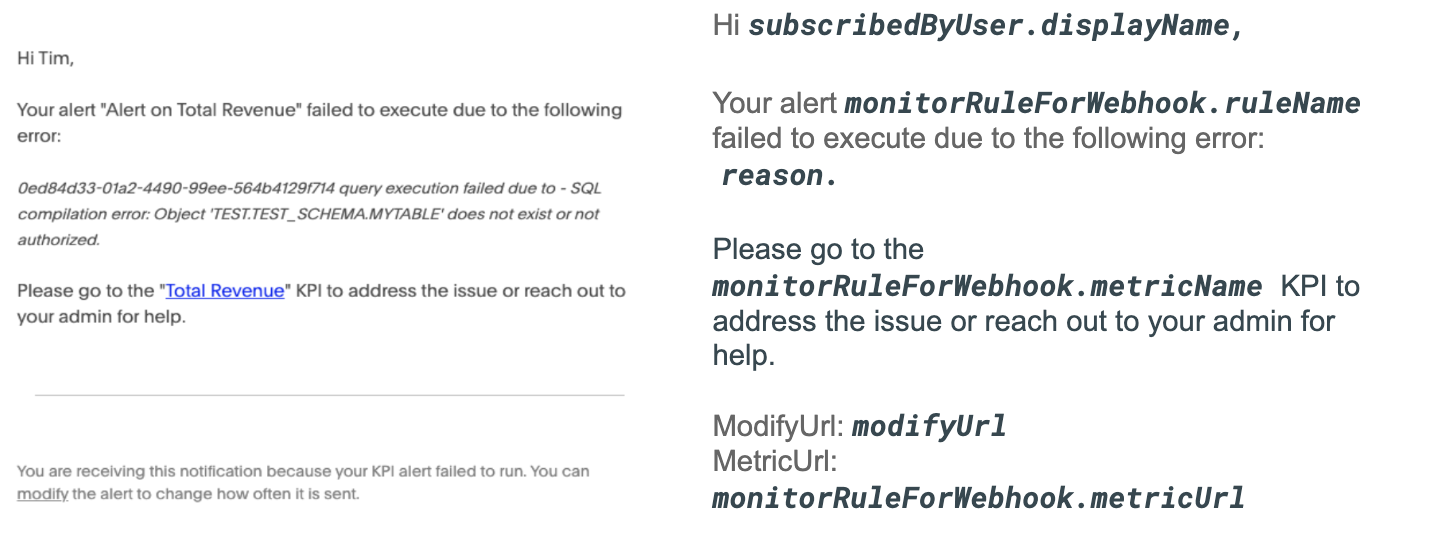
A failure notification is sent to subscribers when an alert execution fails.
The following schema is used in the notification sent when a Webhook alert fails:
FailureWebhookNotification {
    MonitorRuleForWebhook monitorRuleForWebhook,
    String modifyUrl,
    String unsubscribeUrl,
    String reason,
}
The following example shows the email notification sent to the subscribers when an alert execution fails: