
// Import ThoughtSpot SDK
import {
    init,
    LiveboardEmbed,
    Action,
    RuntimeFilterOp,
    EmbedEvent,
    AuthType,
    HostEvent
} from "@thoughtspot/visual-embed-sdk";
import "./styles.css";
import {
    getTokenService
} from "./tokenService";

// Use prefetch to load static resources early and optimize response time.
// Call init early to complete authentication during app load for better performance.
init({
   thoughtSpotHost:
   /*param-start-hosturl*/"https://embed-1-do-not-delete.thoughtspotstaging.cloud" /*param-end-hosturl*/,
   /*param-start-styleCustomization*//*param-end-styleCustomization*/
    authType: AuthType.TrustedAuthTokenCookieless,
    getAuthToken: getTokenService,
    disableTokenVerification: true,
});

// Instantiate class for embedding a Liveboard
const embed = new LiveboardEmbed("#your-own-div", {
    frameParams: {},
    /*param-start-liveboardId*/liveboardId: "d084c256-e284-4fc4-b80c-111cb606449a" /*param-end-liveboardId*/
    /*param-start-activeTabId*//*param-end-activeTabId*/
    /*param-start-liveboardFullHeight*//*param-end-liveboardFullHeight*/
    /*param-start-customizeLiveboardHeader*//*param-end-customizeLiveboardHeader*/
    /*param-start-hideLiveboardHeader*//*param-end-hideLiveboardHeader*/
    /*param-start-runtimeFiltersAndParameters*//*param-end-runtimeFiltersAndParameters*/
    /*param-start-modifyActions*//*param-end-modifyActions*/
});

hideNoDataImage();
showErrorBanner('none');

embed
    // Register event listeners
    .on(EmbedEvent.Init, showLoader)
    .on(EmbedEvent.Load, hideLoader)
    /*param-start-customActionHandle*//*param-end-customActionHandle*/
    .on(EmbedEvent.Error, (error) => {
        if (error?.data?.errorType === 'FULLSCREEN') {
            showErrorBanner('none');
        } else
        if (typeof(error.error) === 'string') {
            showErrorBanner('flex', error.error);
        } else {
            showErrorBanner('flex');
        }
        console.log('Error ', error);
        hideLoader();
    })
    // Render Liveboard
.render();Step 1: Getting started
This tutorial uses the Visual Embed SDK Playground built into every ThoughtSpot instance to demonstrate various customizations in a live environment.
We suggest copying the code into a text editor or IDE such as Visual Studio Code to make it easier to work on the examples, and then copy the values back into the code editor within the Playground.
To get started:
-
Select the
Liveboardcomponent to embed in the Playground: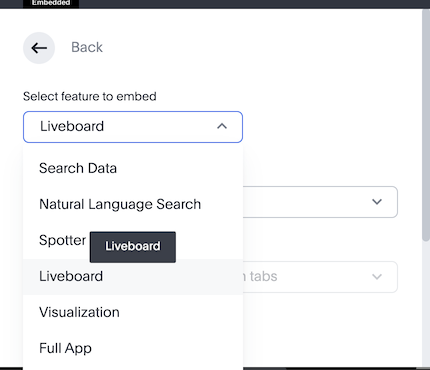
-
Select the (Sample) Sales Performance Liveboard, which should be available on all instances, including the Free Trial setup.
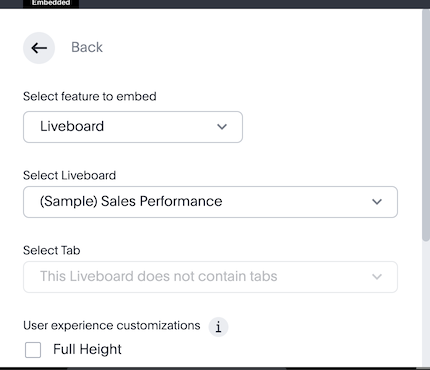
-
If you do not have "(Sample) Sales Performance" available, use any Liveboard that you have access to.
You should see the following code in the code panel of the Playground page.
-
Copy at any point down to
.render();: