
curl -X POST \
  --url 'https://{ThoughtSpot-Host}/api/rest/2.0/auth/token/custom'  \
  -H 'Accept: application/json' \
  -H 'Content-Type: application/json' \
  --data-raw '{
  "username": "secured_user",
  "secret_key": "{secret_key}",
  "persist_option": "REPLACE",
  "filter_rules": [
   {
     "column_name": "Country",
     "operator": "IN",
     "values": ["Germany", "Australia"]
   }
  ]
}'JWT ABAC implementation with filter rules → ABAC via RLS
Table of Contents
To migrate the JWT ABAC implementation with filter rules to the ABAC via RLS method, complete the following steps:
Analyze your current implementation🔗
In a typical legacy JWT ABAC implementation:
-
The
/api/rest/2.0/auth/token/customendpoint is used for JWT generation, populatingfilter_rulesorparameter_valuesin the token to create data security rules. Depending on user requirements, these values are applied on all models or specific models as per the object scope set in the request payload. -
The
is_mandatory_token_filterattribute is set totrueon columns in Models to secure them by default.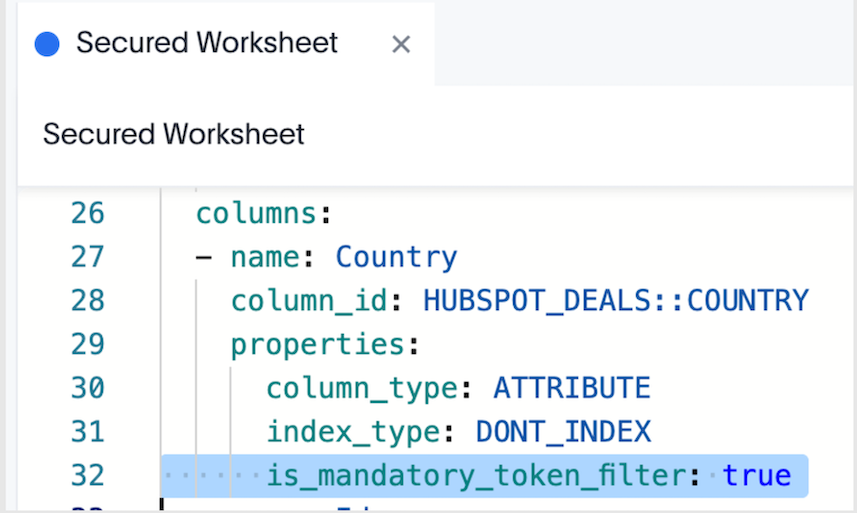
-
Indexing on all sensitive columns in your tables is disabled.
Retrieve values from user properties (Optional)🔗
If required, you can retrieve the filter and parameter values stored for each JWT user from the user metadata via a POST request to the /api/rest/2.0/users/search API endpoint. The access_control_properties section of user metadata returned in the API response includes this information:
[{
	"id": "0000084b-1e75-d506-8258-0b6abbb863ed",
	"name": "testjwtuser",
	"display_name": "testjwtuser",
	[...]
	"access_control_properties": {
		"<org_id>": {
			"ALL": {
				"filter_rules": [{
					"column_name": "country",
					"operator": "IN",
					"values": ["Germany", "Australia"]
				}],
				"parameter_values": []
			}
		}
	},
	"variable_values": {}
}]
Configure equivalent RLS rules and variables🔗
You may want to set up RLS rules and variables equivalent to filter and parameter rules in your existing implementation. Note that the following mapping pattern applies to each attribute:
-
Column in
filter_rules→ RLS rule condition with formula variable on that column. -
Values in
filter_rules→ variable values passed via JWT. -
is_mandatory_token_filterbehavior → RLS rule that denies all when variable is empty or missing. -
TS_WILDCARD_ALLor similar “allow all” semantics → variable valueTS_WILDCARD_ALLin the RLS rule.
To set equivalent RLS rule conditions and variables:
-
Create formula variables using the /api/rest/2.0/template/variables/create API endpoint. These variables will be referenced in RLS rules. To create variables, you need
ADMINISTRATION(Can administer ThoughtSpot) privilege. If role-based access control (RBAC) is enabled on your instance, theCAN_MANAGE_VARIABLES(Can manage variables) privilege is required. -
Create rules using these variable(s) directly on the ThoughtSpot table in the Row Security Editor tab. These should be the same rules as the ones previously defined in the JWT, which will be ultimately replaced after migration. To add multiple conditions, use the
ANDoperator.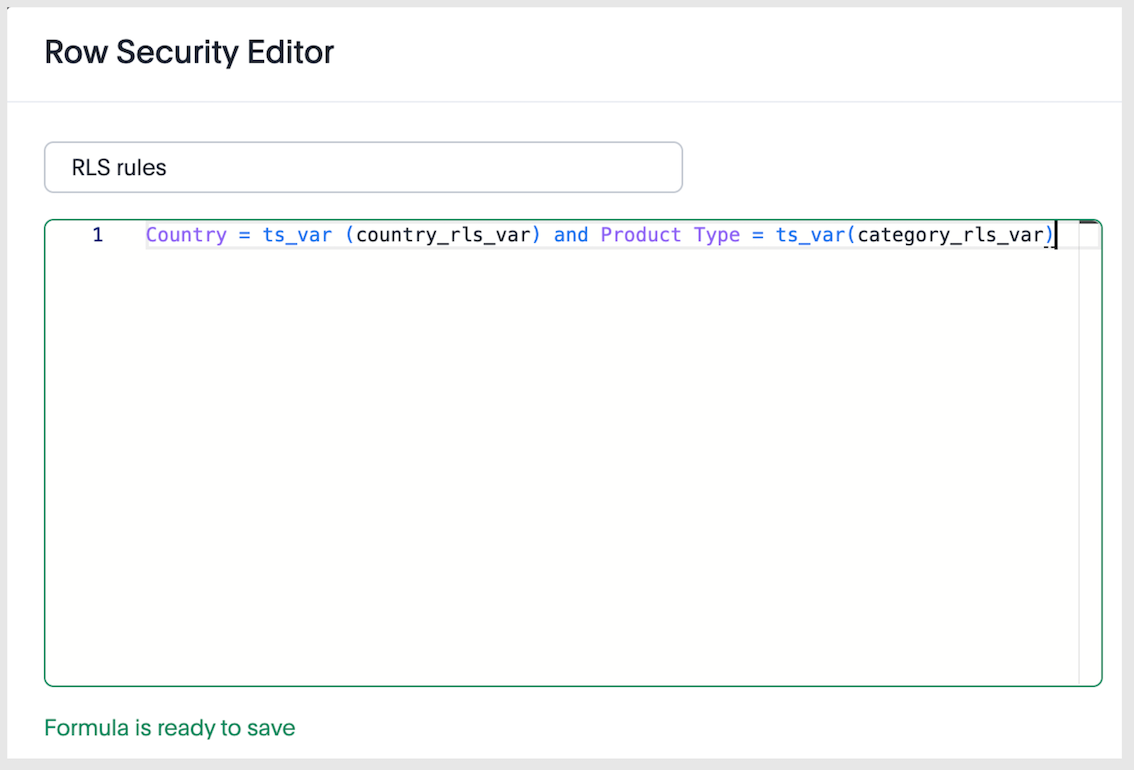
-
Create a JWT token request with
variable_valuesand generate the token using the/api/rest/2.0/auth/token/customAPI endpoint. Note that these values can be scoped to specific models, so that different security rules can be applied to different data in ThoughtSpot.curl -X POST \ --url 'https://{ThoughtSpot-Host}/api/rest/2.0/auth/token/custom' \ -H 'Accept: application/json' \ -H 'Content-Type: application/json' \ --data-raw '{ "username": "secured_user", "secret_key": "{secret_key}", "persist_option": "REPLACE", "variable_values": [ { "name": "country_rls_var", "values": [ "Germany", "Australia" ] }, { "name": "category_rls_var", "values": [ "Jeans", "Jackets" ] } ], "objects": [ { "type": "LOGICAL_TABLE", "identifier": "cd252e5c-b552-49a8-821d-3eadaa049cca" }, { "type": "LOGICAL_TABLE", "identifier": "38399c50-02f1-4310-804b-214b81f25333" } ]}' -
Keep indexing disabled on all sensitive columns.
NoteUsers with administration and Can Administer and Bypass RLS privileges are exempt from RLS rules and can view all rows unless additional logic is implemented to secure rows in the data model. RLS rules are defined on tables, but Models can be configured to either apply or bypass those rules. For more information, see How RLS rules work. -
Verify variable values are assigned to your users. This information can be retrieved using one of the following methods:
-
Via a
POSTrequest to the/api/rest/2.0/users/searchAPI endpoint. Verify thevariable_valuessection of the user metadata returned in the API response. -
Via a
POSTrequest to the/api/rest/2.0/template/variables/searchAPI endpoint, with variables specified in the request body. Setresponse_contenttoMETADATA_AND_VALUESto fetch the variable values and verify the response payload.NoteTo update variable values for a user, use the
/api/rest/2.0/auth/token/customor/api/rest/2.0/template/variables/{identifier}/update-valuesAPI endpoint.
-
Expected setup before the testing phase🔗
Ensure that you have both legacy JWT GA and ABAC via RLS properly set up in your environment before starting the tests. For testing purposes, we’ll use an example setup with filter_rules, the mandatory token filter setting in the model, and RLS rules with country_rls_var and category_rls_var variables.
Your implementation can also include parameters to configure security rules by using pass-through functions. Typically, users may want to map existing security rules, such as those created with filter_rules or parameter values used in model formulas and model filters, to new RLS rules that reference variables and are applied at the table level.
Test the migration🔗
We recommend testing the migration in these main steps:
-
Ensure everything continues to work correctly when both legacy JWT GA and ABAC via RLS are enabled.
-
Remove filter conditions on legacy JWT ABAC implementation to test how security rules function with solely ABAC via RLS.
-
Remove legacy JWT GA, and retain only ABAC via RLS.
|
Important
|
When creating a token request with |
Legacy rules🔗
The legacy parameters, filter_rules and parameter_values, are linked. If you define one without including the other in the API request, the omitted parameter will be deleted from the user profile. This behavior remains unchanged with the introduction of variable_values to maintain backward compatibility.
Migration to variable values🔗
The variable_values parameter in the ABAC via RLS implementation operates independently.
Sending variable_values alone will not erase your legacy rules. Likewise, sending legacy parameters without variable_values will not erase stored variable values.
This allows developers to assign variable_values for ABAC via RLS without disrupting an existing legacy JWT GA setup. To reset all legacy values from users' metadata, use "persist_option": "RESET".
Summary matrix🔗
Use the information in the following table to understand how API calls change the user’s stored security settings and variable store settings:
| Your payload includes… | filter_rules in user’s access_control_properties | parameter_values in user’s access_control_properties | variable_values in the variable store |
|---|---|---|---|
Legacy requests | |||
Both | Updates | Updates | Unchanged |
Only | Updates | DELETED | Unchanged |
Only | DELETED | Updates | Unchanged |
Migration calls | |||
| Updates | DELETED | Updates |
| DELETED | Updates | Updates |
| Updates | Updates | Updates |
ABAC via RLS only | |||
Only | Unchanged | Unchanged | Updates |
Phase 1: Test RLS while legacy JWT configuration is still enabled🔗
Generate tokens that include both:
-
Your existing legacy JWT ABAC keys (
filter_rulesand/orparameter_values) -
New
variable_valuesfor your RLS rules
For example:
curl -X POST \
  --url 'https://{ThoughtSpot-Host}/api/rest/2.0/auth/token/custom'  \
  -H 'Accept: application/json' \
  -H 'Content-Type: application/json' \
  --data-raw '{
  "username": "secured_user",
  "secret_key": "{secret_key}",
  "persist_option": "REPLACE",
  "filter_rules": [
   {
     "column_name": "Country",
     "operator": "IN",
     "values": ["Germany", "Australia"]
   }
  ],
  "variable_values": [
    {
      "name": "country_rls_var",
      "values": [
        "Germany",
        "Australia"
      ]
    }
  ]
}'
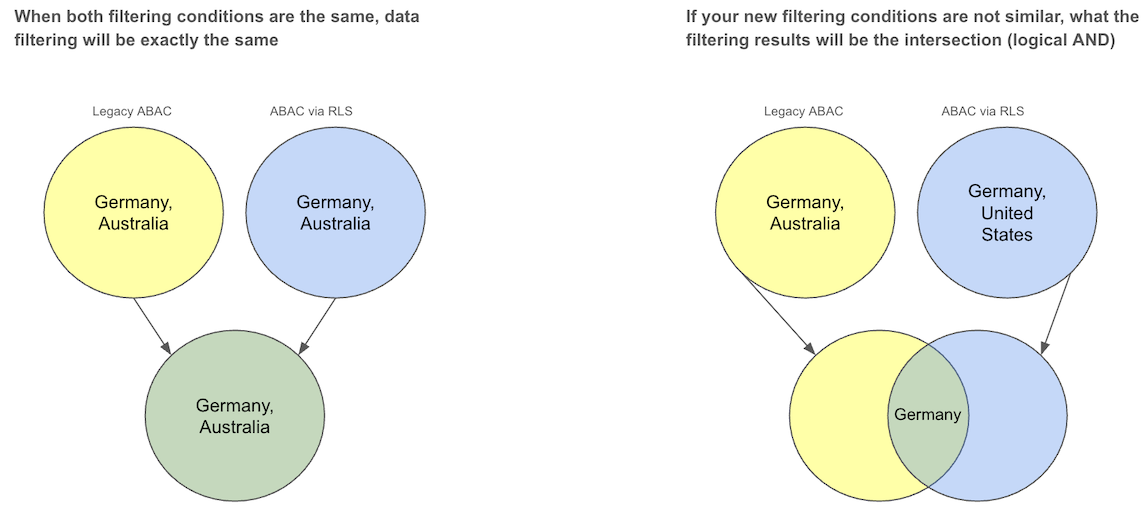
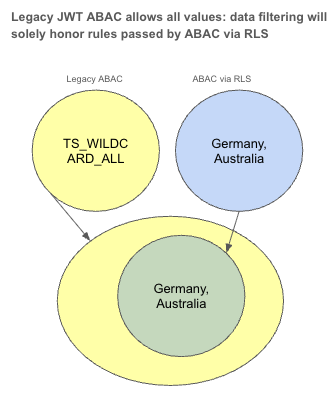
Since both conditions are similar, the data should be filtered uniformly as shown in the following diagram. If the filtering conditions differ, the resulting data should be the intersection of the two.
Phase 2: Bypass legacy JWT configuration🔗
If the phase 1 testing is conclusive, bypass legacy JWT configuration. To test RLS independently while keeping legacy JWT configuration as a fallback:
-
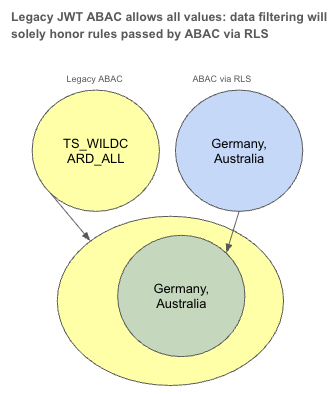
When generating tokens, set the legacy JWT ABAC implementation to allow everything by using the keyword
TS_WILDCARD_ALLin your legacyfilter_rulesandparameter_values. -
Keep sending
variable_valuesfor the RLS rules as before.
For example:
curl -X POST \
  --url 'https://{ThoughtSpot-Host}/api/rest/2.0/auth/token/custom'  \
  -H 'Accept: application/json' \
  -H 'Content-Type: application/json' \
  --data-raw '{
  "username": "secured_user",
  "secret_key": "{secret_key}",
  "persist_option": "REPLACE",
  "filter_rules": [
   {
     "column_name": "Country",
     "operator": "IN",
     "values": ["TS_WILDCARD_ALL"]
   }
  ],
  "variable_values": [
    {
      "name": "country_rls_var",
      "values": [
        "Germany",
        "Australia"
      ]
    }
  ]
}'
After this configuration, all filtering is governed by the variable rules set for ABAC via RLS, since legacy JWT implementation with filter_rules allows all values.
Phase 3: Remove all legacy JWT rules🔗
After the legacy JWT configuration values are set to allow all values for that user, subsequent calls can be made without setting the legacy JWT ABAC values.
This allows you to test the payload with variable_values, which you ultimately will be using to generate authentication tokens in the future.
For example:
curl -X POST \
  --url 'https://{ThoughtSpot-Host}/api/rest/2.0/auth/token/custom'  \
  -H 'Accept: application/json' \
  -H 'Content-Type: application/json' \
  --data-raw '{
  "username": "secured_user",
  "secret_key": "{secret_key}",
  "persist_option": "APPEND",
  "variable_values": [
    {
      "name": "country_rls_var",
      "values": [
        "Germany",
        "Australia"
      ]
    }
  ]
}'
After this step:
-
Legacy JWT ABAC GA rules are no longer in effect.
-
User access is governed solely by ABAC via RLS.
-
This payload should match what you plan to use in production.
|
Note
|
When you are ready to roll out the ABAC via RLS configuration, you must disable or remove the |
Examples for mapping legacy JWT ABAC GA expressions to ABAC via RLS🔗
A few examples of how to translate legacy JWT expressions into equivalent RLS rules are listed here. These examples assume the following:
-
Your setup has a variable named
country_rls_var. -
RLS expressions use
ts_var(country_rls_var)to reference the value passed viavariable_values.
| Operator | Legacy JWT ABAC implementation | Equivalent values in RLS rules in table for ABAC via RLS |
|---|---|---|
| |
|
| |
|
| |
|
| |
|
|
Note
|
RLS rules support multi-value variables; use appropriate functions or operators in the RLS expression depending on how you want to handle lists. |
Additional resources🔗
-
For information about JWT with custom variables and RLS rules, see ABAC via RLS rules.
-
For information about RLS, see RLS Rules and ThoughtSpot Product Documentation.