
Git provider integration
Table of Contents
Git providers such as GitHub, GitLab, Azure DevOps and BitBucket can run scripts that use the ThoughtSpot REST API and TML modification capabilities.
This allows the Git provider to become the centralized control service for deployment processes to ThoughtSpot.
The combination of Git commands and ThoughtSpot REST API calls allows for controlled synchronization of the Git repo and the various ThoughtSpot Orgs that represent environments within the software deployment lifecycle.
|
Note
|
The legacy GitHub REST APIs are used through ThoughtSpot and are tied to GitHub exclusively. The Git provider integration pattern provides more flexibility and control. |
Overview🔗
The Git provider integration pattern is based on storing the necessary secrets in the Git provider to allow ThoughtSpot REST API commands to be run by the Git provider when accomplishing tasks on demand or on a schedule.
All imports and exports of ThoughtSpot TML files to and from branches, along with the commits and merges are controlled entirely in git using the Git provider’s capabilities.
The two fundamental workflows are TML Export to branch from Org and TML Import from branch to Org:
TML Export to branch from Org🔗
-
git checkout {branch-name}: switch to existing remote branch or create local branch -
git pull: bring down latest from remote of branch -
Script to find desired objects then Export TML, saving TML files to disk with regular save command using name pattern
{obj_id}.{type}.tml -
git diff-index --quiet HEAD || git commit -a -m "{commit msg}" -
git push: Send changes to remote
|
Note
|
If there are no changes to any files, |
The script that actually downloads the TML should also have capabilities for filtering items to just the release package. The same download script can handle pure version control (downloading all items) as well as downloading only the items of the release package.
Efficient exporting using modified timestamp🔗
TML Export causes activity on a ThoughtSpot instance, as TML is generated dynamically at the time of request from the current state of the objects in ThoughtSpot.
To make the process more quick and efficient, you can implement a method for only exporting objects that have changed since the last TML Export was run, using the /metadata/search REST API response, which contains a modified timestamp in the metadata_header section.
TML Import from branch to Org🔗
-
git checkout {branch-name/tag}: switch to existing remote branch or tag -
git pull: bring down latest from remote of branch -
Script to find all desired TML files in the directory, then use TML Import REST API to import into the target Org
-
Script to share newly created objects to Groups in the destination Org
Setup🔗
Each Git provider has its own mechanisms for doing the following, but the overall pattern described should be possible in any of them.
Essentially, the Git provider will store the necessary details and secrets to make REST API calls to the ThoughtSpot instance(s).
Secrets and variables🔗
The following should be stored within the Git provider for use within any automated workflows:
-
TS_SERVER
-
TS_SECRET_KEY
-
TS_INSTANCE_ADMIN_USERNAME
-
TS_DOWNLOAD_USERNAME
-
TS_IMPORT_USERNAME
Some of these, such a TS_DOWNLOAD_USERNAME and TS_IMPORT_USERNAME may vary at a branch / environment level. Even TS_SERVER and TS_SECRET_KEY may have variations per branch if you are using multiple ThoughtSpot instances.
Branches🔗
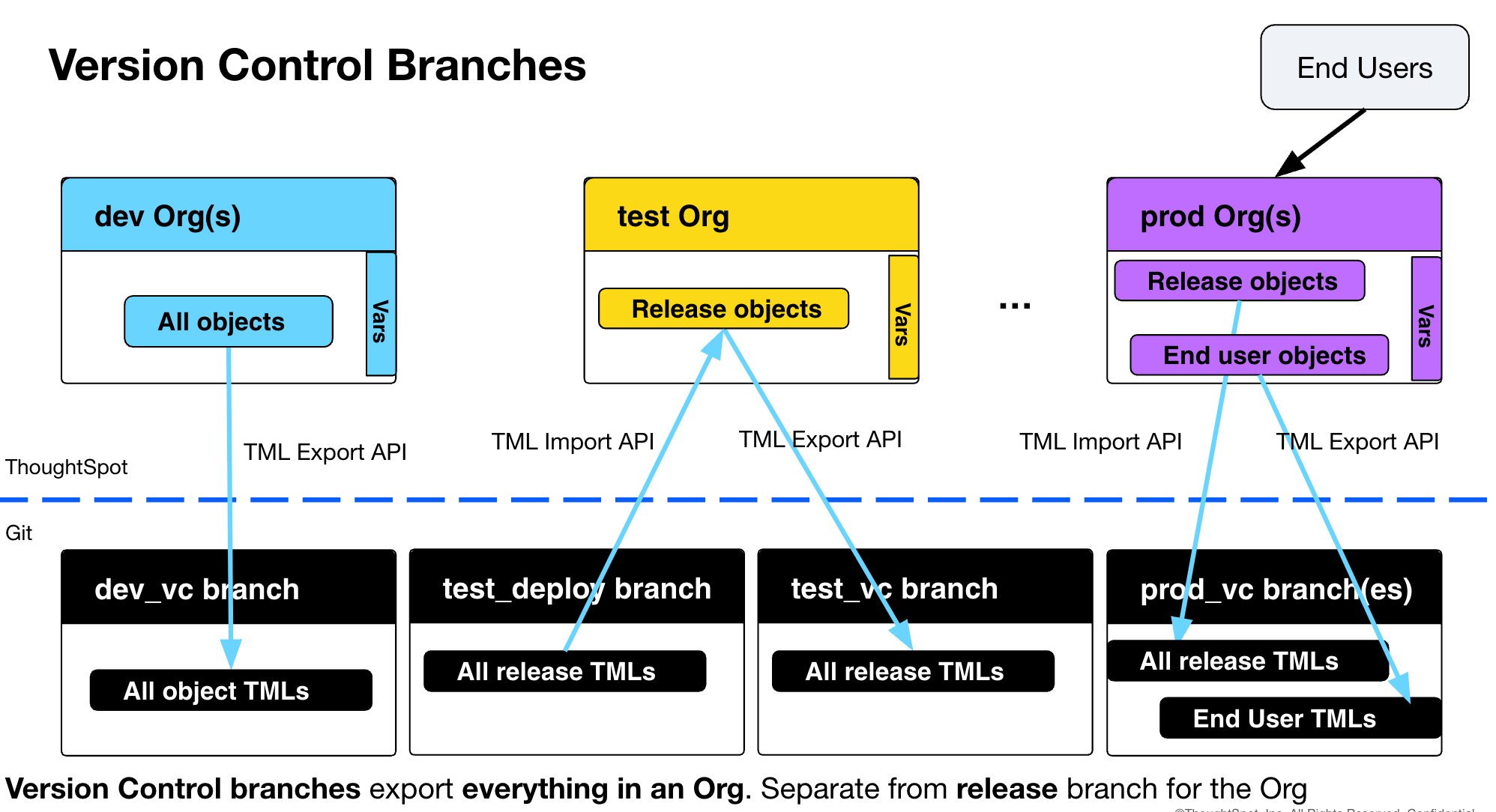
Due to the nature of ThoughtSpot TML, you’ll want to separate deployment branches for the release package from any "pure version control" branches.
Pull requests / merges should be possible smoothly from "release" → "test_deploy" → "uat_deploy" → "prod_deploy", without needing to resolve any merge conflicts.
The following is an example branch scheme, you are welcome to adjust the names to match your preferences:
-
main / master: Actions / workflows / other shared assets, but no TML files from any Org
-
dev_vc: Version Control for all content on Dev Org
-
release: Branch for Specific Content to go through deployment to other Orgs
-
test_deploy: Import TML from 'release' and do other Actions to Test Org
-
test_vc: Version control for all content on Test Org
-
Optional UAT / etc.:
-
uat_deploy: Import TML from 'release' and do other Actions to UAT Org
-
uat_vc: Version control for all content on UAT Org
-
-
prod_deploy Import TML from 'release' and do other Actions to Prod Org(s)
Version control for prod Orgs:
-
prod_vc: if single Prod, version control of all Content
-
customer_orgs(s): version control branch for each Single Tenant Org
Local branches, copies and edits🔗
ThoughtSpot itself is the "living source of truth", with TML only a representation of the current state of the object in the system at the time of TML Export or the desired state to bring the system to via TML Import.
A TML Import will cause the existing object in ThoughtSpot with the same identifier (obj_id or guid if no obj_id is present) to update to match the state described in the imported TML file.
You can edit a TML file in a local branch, but using TML Import to see the result in the originating Org will cause the object to be updated.
There are two options:
-
Create a new Org to represent the local branch, to test the new TML
-
Create a copy object in the original org, with a different identifier
The final step would be to change the identifier in the copy object’s TML to match the original identifier, then TML Import the file back into the original Org.
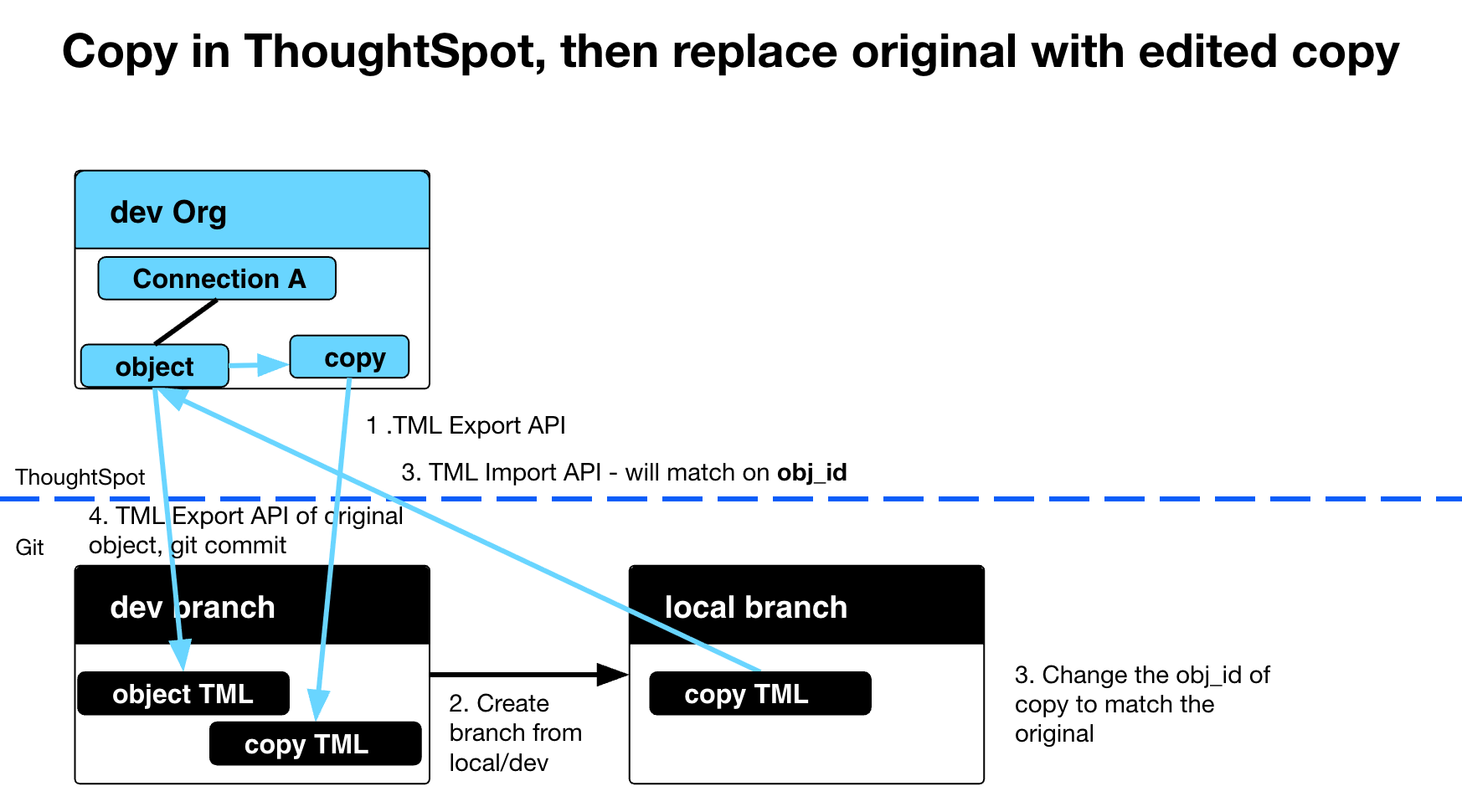
Actions like this can be performed in git however your team feels most comfortable with. The resulting changes in the "dev Org" then become part of the release package files that are exported and moved through the deployment stages like normal.
Other sync actions🔗
Deleting objects🔗
When an object is deleted in the dev Org, you also need to git rm the file within the git release branch, so that the file will be deleted in downstream branches as you do pull/merge requsts.
The following is the git and REST API portion of an example GitHub workflow that cleans up files that do not have a matching object in the Org any longer.
It looks at whether the filenames (matching obj_id) in the dev branch of the git directory continue to exist via /metadata/search REST API command. If not found, issue git rm to remove the TML file, then git commit and git push to update the origin/branch.
The files_with_no_obj_on_org.py script is what performs the /metadata/search REST API to get the list of existing objects, then looks at all the files in the git branch to see which filenames do not have corresponding obj_ids:
run: |
        git config --local user.email "${{ github.actor_id }}+${{ github.triggering_actor }}@users.noreply.github.com"
        git config --local user.name "${{ github.triggering_actor }}"
        python .github/workflows/files_with_no_obj_on_org.py > files_to_remove.txt
        if [ -s "files_to_remove.txt" ]; then
        echo "Files found in Org: ${{ vars.TS_ORG_NAME }} for removal:"
        cat files_to_remove.txt
        if [ "${{ github.event.inputs.DELETE_FLAG }}" = "DELETE" ]; then
        echo "Deleting the files"
        cat files_to_remove.txt | xargs git rm
        rm files_to_remove.txt
        git add *
        git diff-index --quiet HEAD || git commit -a -m "Run ID ${{ github.run_id }}/${{github.run_attempt}} cleanup files from Org ${{ vars.TS_ORG_NAME }}"
        git push
        fi
        else
        echo "No files found to remove"
        rm files_to_remove.txt
fi|
Note
|
You cannot do the reverse and simply delete objects from an Org that do not have equivalent TML files in the git directory, because end users can create new objects in an Org. |
You also must consider that attempts while git rm command on files in release branch will flow upstream through via merge commands, removing data objects in the linked Orgs may fail if any user-created content in those Orgs are connected to the data objects.
Thus the full deletion / cleanup process may involve manual "clean-up" in Orgs where ThoughtSpot does not allow object deletion without first deleting or changing the data source of dependent objects.
obj_id updates🔗
The obj_id property is simple enough to change within an Org, however the files in the repo are typically named after the obj_id of the object at the time of export. There will also be objects in the other Orgs with the same obj_id.
An obj_id update should thus be initiated from the Git provider to rename the existing file and perform the ThoughtSpot REST API commands to update the obj_id across all Orgs with a copy of the object.
The following is the git and REST API portion of example of a workflow in GitHub Action syntax to handle the rename of an object in the dev Org and release branch:
    - name: Change obj_id and rename file
      env:
       TS_SERVER: ${{ secrets.TS_SERVER }}
       TS_SECRET_KEY: ${{ secrets.TS_SECRET_KEY }}
       TS_USERNAME: ${{ secrets.TS_INSTANCE_ADMIN_USERNAME }}
       OLD_OBJ_ID: ${{ github.event.inputs.OLD_OBJ_ID }}
       NEW_OBJ_ID : ${{ github.event.inputs.NEW_OBJ_ID }}
      run: |
        git config --local user.email "${{ github.actor_id }}+${{ github.triggering_actor }}@users.noreply.github.com"
        git config --local user.name "${{ github.triggering_actor }}"
        echo "Import to Org_ID $ORG_ID rename $OLD_OBJ_ID to: $NEW_OBJ_ID"
        if find . -name "${{ github.event.inputs.OLD_OBJ_ID }}*" -print -quit | grep -q .; then
        echo "file for ${{ github.event.inputs.OLD_OBJ_ID }} found"
        echo "Updating obj_id in org from ${{ github.event.inputs.OLD_OBJ_ID }} to ${{ github.event.inputs.NEW_OBJ_ID }}"
        python .github/workflows/update_obj_id.py
        echo "obj_id updated, now renaming file in repo"
        O_FILE=$(find . -name "${{ github.event.inputs.OLD_OBJ_ID }}*" -print)
        N_FILE="${O_FILE//${{ github.event.inputs.OLD_OBJ_ID }}/${{ github.event.inputs.NEW_OBJ_ID }}}"
        echo "$O_FILE rename to $N_FILE"
        git mv $O_FILE $N_FILE
        git diff-index --quiet HEAD || git commit -a -m "Run ID ${{ github.run_id }}/${{github.run_attempt}} changed obj_id"
        git push
        echo "File rename successful"
        else
        echo "no file found matching ${{ github.event.inputs.OLD_OBJ_ID }}, no action taken"
        fi
GitHub Actions example🔗
The workflows are composed of a YAML workflow file and a Python script using the thoughtspot_rest_api Python library. Both components are useful starting points for implementing in a different Git provider.