
-
Supports advanced analytics, forecasting, and deep research capabilities.
-
Supports asynchronous streaming, session-based conversations, and context integration.
MCP Server with Spotter 3 capabilities
Table of Contents
ThoughtSpot Spotter MCP Server supports Spotter 3, which enables advanced analytics, forecasting, multi-step reasoning and analysis, and deep research capabilities. The MCP Server with Spotter 3 introduces new MCP tools, real-time streaming responses, session-based conversations, and richer interactions.
| Legacy MCP Server setup | MCP Server with Spotter 3 | |
|---|---|---|
Functional differences | Limited capabilities for complex analysis and context integration. | |
Recommended for | Maintaining existing integrations only. | All new integrations |
Integration pattern | Synchronous and stateless integration pattern. Each tool call is independent. Does not support persistent sessions and requires prior context to be injected manually on every follow-up call. | Asynchronous and stateful sessions. Allows multiple follow-up questions within a session. Responses are streamed with intermediate updates, including thinking narration and clarifications. Context is retained automatically across all follow-up questions within the session. |
Data source selection | Requires a separate tool call ( | Built into session creation. If the |
Response delivery | Returns full response in a single synchronous call. | Responses are streamed incrementally; updates are accumulated via polling. |
Follow-up questions | Requires prior context on every follow-up call. | The session retains context automatically. |
API versioning support | Not available. | Supports date-based API versioning, which is identified in the MCP Server URL as |
The following figure illustrates the MCP architecture, tool calls, and workflow in the new MCP Server version:
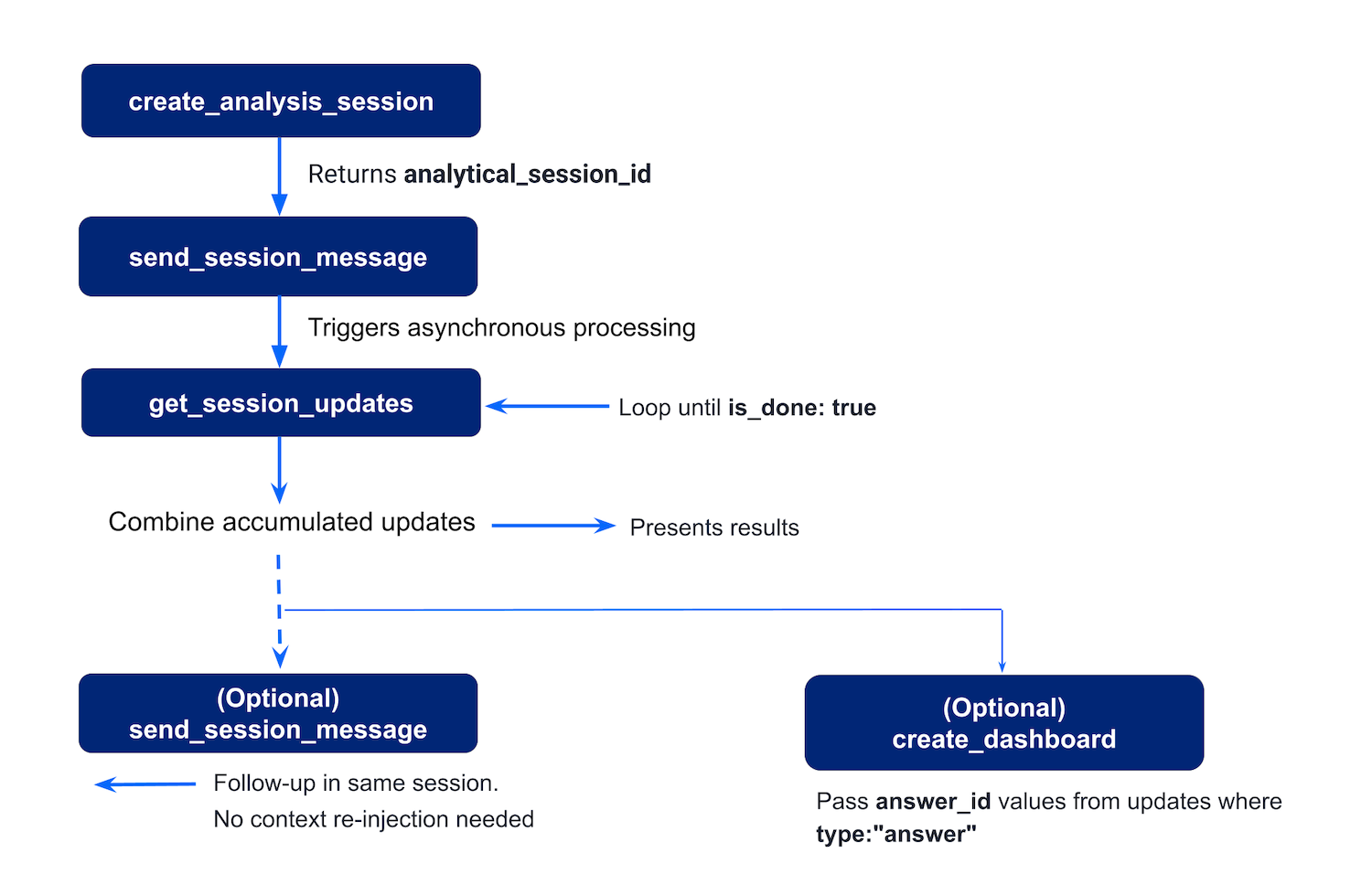
Tool calls and workflow processing🔗
The workflow in the MCP Server with Spotter 3 typically includes the following stages:
-
User asks a question
A user sends a query in the chat interface to get data insights. For example, What were the total sales of Jackets and Bags in the Northeast last year? -
Agent calls
create_analysis_session
The agent callscreate_analysis_sessionto establish a stateful analytical session with ThoughtSpot’s Spotter 3 engine. ThoughtSpot returns ananalytical_session_idthat identifies the session for all subsequent calls.
If the user specified a data source, the agent passes it as the optionaldata_source_idparameter. If not specified, ThoughtSpot automatically selects the most relevant data source based on the question. -
Agent calls
send_session_message
The agent callssend_session_messagewith theanalytical_session_idand the user’s question. Optionally, the agent can passadditional_contextto provide external information that should influence the analysis. For example,The user’s fiscal year starts in AprilorThe user is a manager of the West region.
ThoughtSpot confirms receipt with asuccessresponse and begins processing the question asynchronously. The answer is not returned in this call. -
Agent polls
get_session_updatesfor results
The agent callsget_session_updatesrepeatedly in a loop untilis_doneistrue. ThoughtSpot streams updates incrementally across multiple polls. The agent must accumulate updates from every poll.
-
User generates a dashboard with the results (optional)
The user can choose to save answers from the conversation as a ThoughtSpot dashboard. For this workflow, the agent extracts theanswer_idandanswer_titlefrom eachanswertype update collected during polling and callscreate_dashboard.
ThoughtSpot creates a dashboard and returns adashboard_idand adashboard_url, a direct link to the dashboard in the ThoughtSpot UI.
The other optional tool calls include:
-
User asks a follow-up question (optional)
The user can ask a follow-up question in the same session. The agent callssend_session_messageagain using the sameanalytical_session_id. ThoughtSpot retains the full conversation context automatically. The agent returns to step 4 to poll for the follow-up response. -
User switches to a different Org (optional)
If the user belongs to more than one Org and connects over OAuth, the agent callslist_orgsto return all accessible Orgs and flags the Org that the user is currently logged in. When the user requests a switch, the agent callsswitch_orgwith the targetorg_id. For more information, see Org switching tools. -
Agent searches for existing content (optional)
If the user refers to content that already exists, for example, "open the regional sales Liveboard", the agent callssearch_objectswith a search term and optional filters such as object type, author, tag, or verified status.search_objectsreturns a ranked list of matching objects with their metadata and deep links.
Additional resources🔗
-
For information about MCP, see the Model Context Protocol specification.
-
For implementation details, see the MCP Server GitHub repository.