
Legacy MCP Server architecture and tools
Table of Contents
The legacy ThoughtSpot Spotter Model Context Protocol (MCP) Server setup uses synchronous architecture. It does not support advanced analytics, session context retention, automatic data source selection, streaming responses, and the full answer is always returned inline. All context and data source management must be handled by the client on every request.
- Functional capabilities
-
Limited capabilities for complex analysis and context integration.
- When to use
-
It is recommended only for maintaining existing integrations, not for new development or advanced use cases.
- Integration pattern and session model
-
The integration pattern is synchronous and stateless. Each tool call is independent and there is no persistent session. Any required context must be manually injected with every follow-up call, as the server does not retain context between requests.
- Data source selection
-
Data source suggestions are not built-in. A separate tool call (
getDataSourceSuggestions) is required to retrieve possible data sources for each query. - Response delivery
-
The server returns the full response in a single, synchronous call. There is no support for streaming or incremental updates.
- Follow-up questions
-
Every follow-up call requires the prior context to be manually included, as the server does not maintain conversational state.
Tool calls and workflow processing🔗
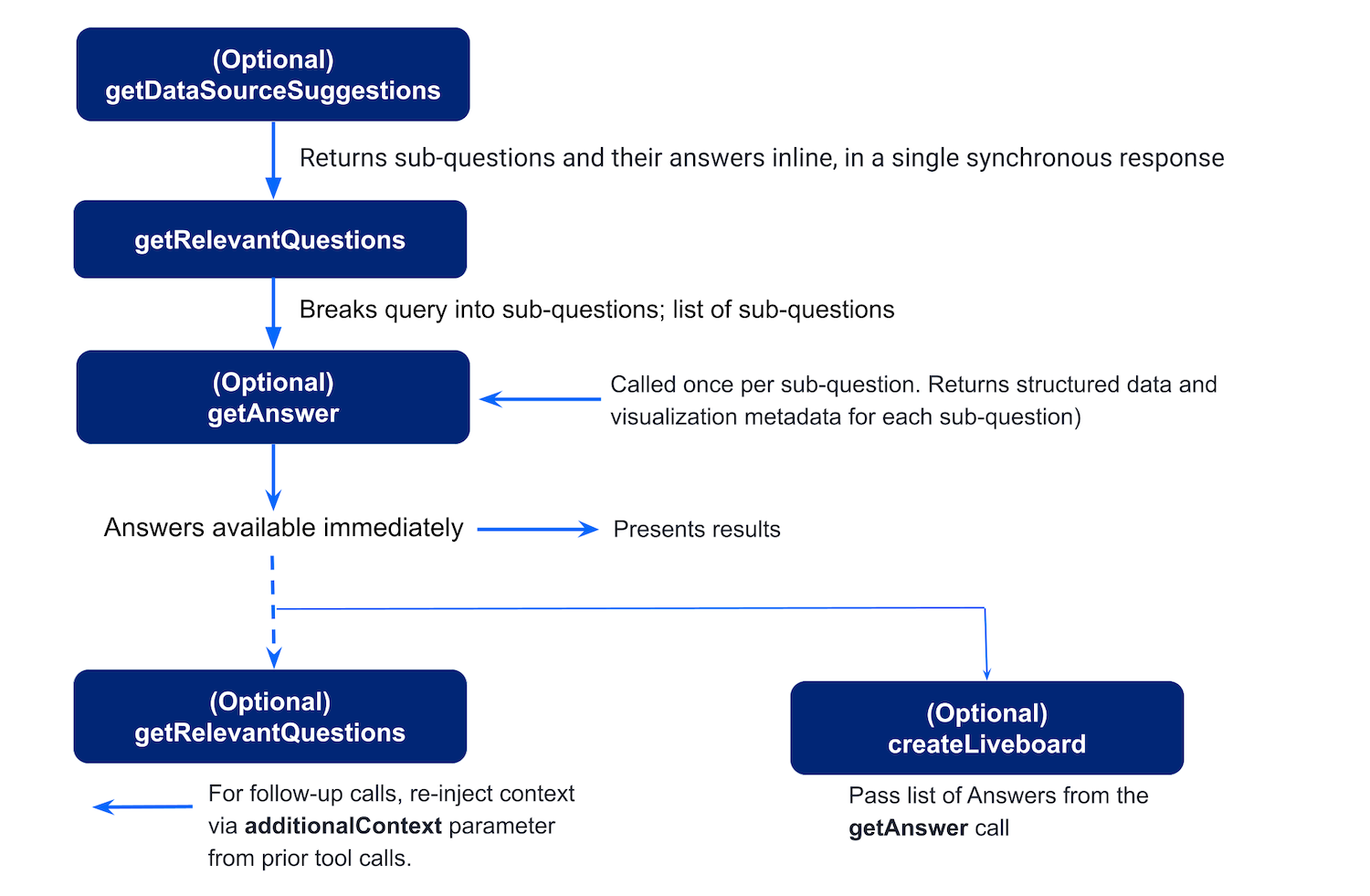
The workflow in the legacy Spotter MCP Server setup typically includes the following stages:
-
User asks a question
A user sends a query in the chat interface to get data. For example,What were the total sales of Jackets and Bags in the Northeast last year?
Optionally, the user can specify the data context to generate a response. -
Agent calls
getDataSourceSuggestions(optional)
If the user’s question doesn’t specify a data source, the agent can callgetDataSourceSuggestionsto retrieve a list of relevant ThoughtSpot data sources. ThoughtSpot returns candidate data sources (models) with confidence scores and reasoning. -
User’s query is decomposed into sub-questions
To break the user’s query into sub-questions, the agent callsgetRelevantQuestions. ThoughtSpot returns the AI-suggested, schema-aware questions that are easier to execute analytically. -
The query is processed for generating answers
For each suggested or chosen question, the agent callsgetAnswer. ThoughtSpot returns the following:-
Preview data for LLM reasoning.
-
Visualization metadata, including an embeddable
frame_url. -
session_identifierandgeneration_numberfor charts that are used as input for creating a Liveboard.
-
-
A Liveboard is generated from the results (optional)
To save answers from the conversation sessions in a ThoughtSpot Liveboard, the agent extracts thequestion,session_identifier, andgeneration_numberfrom eachgetAnswerresponse and callscreateLiveboard.
ThoughtSpot creates a persistent Liveboard from the session’s answers and returns identifiers and aframe_urlfor the Liveboard.
In the legacy Spotter MCP Server setup, to ask a follow-up question, the agent calls getRelevantQuestions again, because the server doesn’t retain context. For follow-up questions, the agent must pass the context explicitly via additionalContext.
For more information about the tool calls, input parameters, and response output, see MCP tool reference guide.
Additional resources🔗
-
For information about MCP, see the Model Context Protocol specification.
-
For implementation details, see the MCP Server GitHub repository.